About Business Second Brain OS: Knowledge & Work
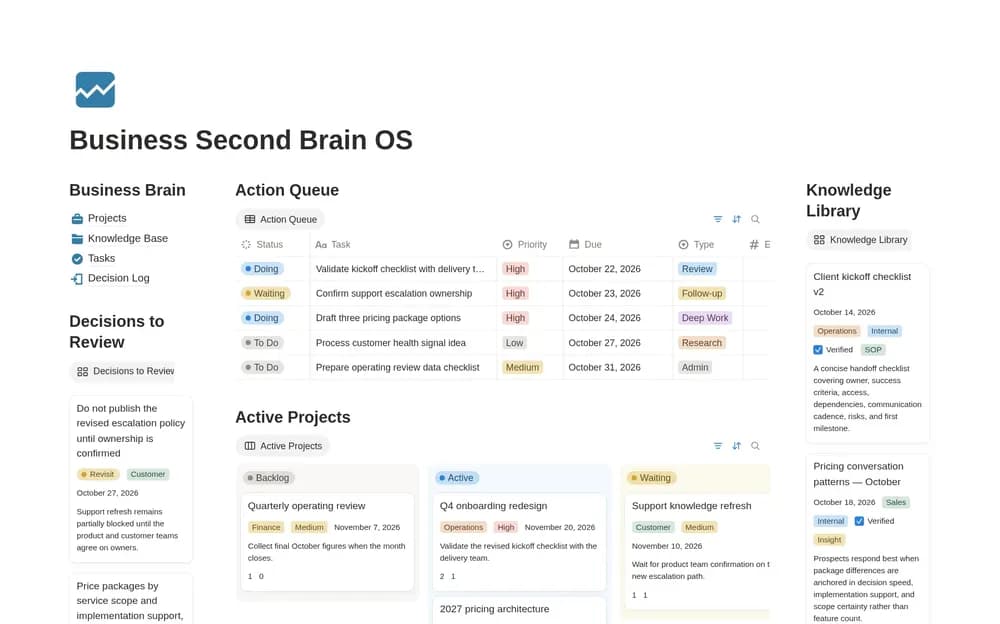
Gather business projects, tasks, a searchable knowledge base, and a decision log into a Notion second brain for founders and small business owners.
What’s included
- Projects database with progress and related tasks
- Knowledge base for notes, processes, and resources
- Tasks linked to projects
- Decision log with the reasoning behind each decision
How to use it in practice
Add your two or three active business projects and the tasks for this week. Document one process you repeat often in the knowledge base. Each time you make a meaningful decision during the week, record it with its reasoning, then review the log on Friday to see whether it gives useful context.
Set it up in your workspace
- Open the original Notion Marketplace listing and add the template to your chosen workspace while signed in. Keep its example records until you understand how the pages connect.
- Add your two or three active business projects and the tasks for this week.
- Try one complete example before adding a large backlog. Check that its views and any calculations show what you expect, then replace the sample content with your own.
Who it suits and what to consider
Entrepreneurs, freelancers, and solopreneurs who want company knowledge and work in one hub. The listing covers four databases, so CRM, finance, and client tracking are not included. Team use depends on how you share the workspace in Notion.