About Personal Wiki OS: Second Brain & Productivity
Combine tasks, projects, life areas, and a searchable knowledge library in a Notion personal wiki, with automatic project progress and weekly reviews.
What’s included
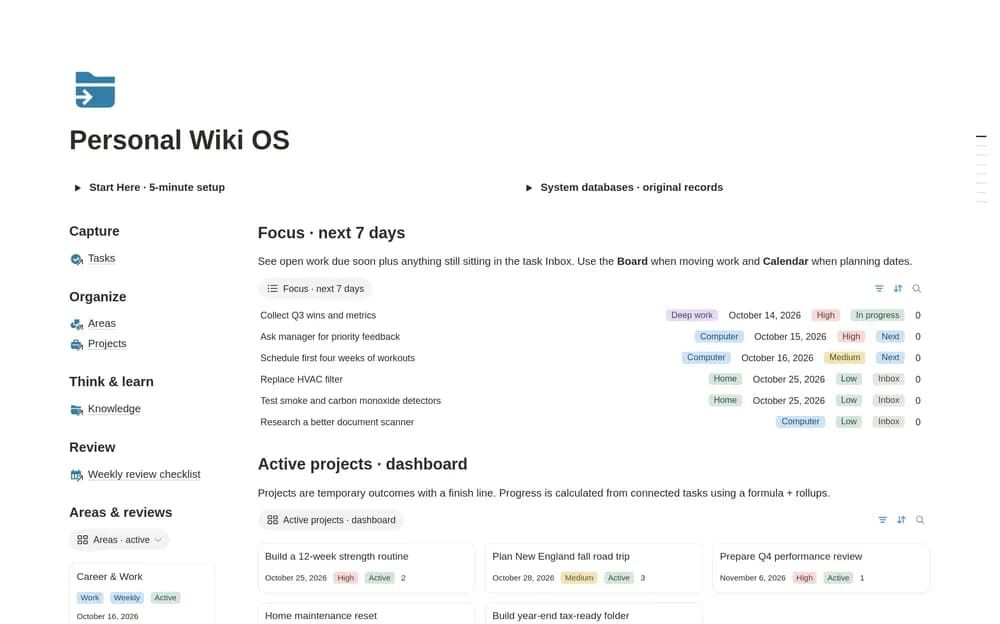
- Task manager with a Next 7 Days focus view
- Project dashboard with progress from related tasks
- Areas of life dashboard
- Knowledge library for notes, references, how-tos, decisions, and journal entries
- Weekly review system
How to use it in practice
Add your active projects and the tasks due in the next week, then check that project progress updates when you complete one. Save a few notes or how-tos into the knowledge library and link them to an area. Use the Next 7 Days view daily and finish the week with the weekly review.
Set it up in your workspace
- Open the original Notion Marketplace listing and add the template to your chosen workspace while signed in. Keep its example records until you understand how the pages connect.
- Add your active projects and the tasks due in the next week, then check that project progress updates when you complete one.
- Try one complete example before adding a large backlog. Check that its views and any calculations show what you expect, then replace the sample content with your own.
Who it suits and what to consider
Professionals, students, and creators who want tasks and personal knowledge in one place. Progress rollups depend on tasks being linked to projects. The knowledge library is only as searchable as the titles and tags you give it.