About Clean Girl Dashboard
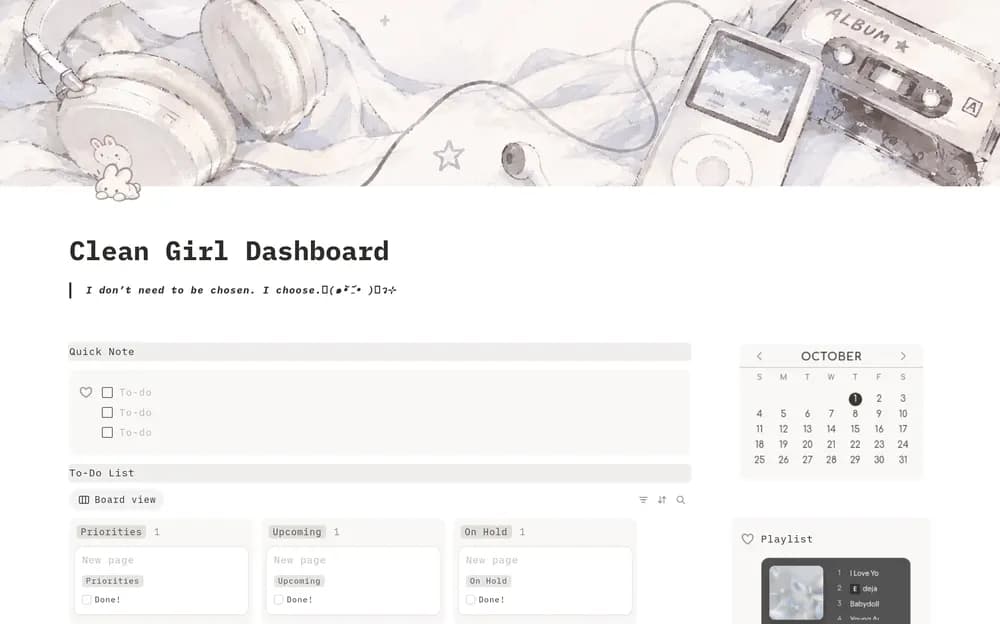
Keep notes, prioritized to-dos, a daily routine tracker, a calendar, and a playlist on one minimal clean-girl style Notion dashboard.
What’s included
- Quick Notes section
- To-do list split into Priorities, Upcoming, and On Hold
- Daily routine and habit tracker with progress
- Calendar
- Playlist section
How to use it in practice
Sort your current tasks into Priorities, Upcoming, and On Hold. Add three or four daily routine items and check them off each day for a week. Use Quick Notes for stray thoughts, keep upcoming events on the calendar, and at the end of the week trim any section you never opened.
Set it up in your workspace
- Open the original Notion Marketplace listing and add the template to your chosen workspace while signed in. Keep its example records until you understand how the pages connect.
- Sort your current tasks into Priorities, Upcoming, and On Hold.
- Try one complete example before adding a large backlog. Check that its views and any calculations show what you expect, then replace the sample content with your own.
Who it suits and what to consider
Students and anyone who wants a soft, minimal homepage for everyday planning. The playlist and some widgets may rely on embeds from outside services. The listing does not describe syncing the calendar with Google Calendar or another external calendar.