About Dark Luxury Personal Dashboard (Basic Version)
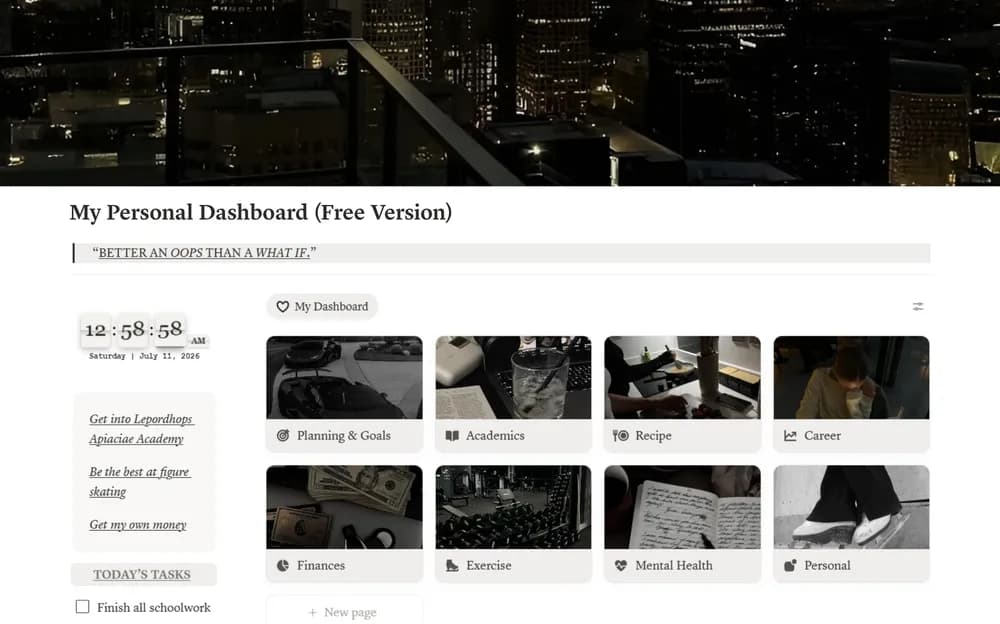
This is a basic version of a dark-themed personal dashboard. The visual treatment is part of the appeal, but check readability on the screen you use most. Try the underlying organization with current information before deciding which decorative elements to keep.
What’s included
- A dark-style home with clock, notes, links, calendar, and resources
- Morning and evening routine buttons, tasks, goals, habits, and a Pomodoro timer
- Pages for study, exercise, recipes, finances, career, planning, and personal life
How to use it in practice
Replace the main links with the pages you actually use and choose a few daily sections. Test the routine buttons with sample content before adapting them. Check the timer and clock on your usual device, then simplify anything that pushes current tasks too far down. Keep occasional reference pages available without making them part of every daily check-in.
Set it up in your workspace
- Open the original Notion Marketplace listing and add the template to your chosen workspace while signed in. Keep its example records until you understand how the pages connect.
- Add the pages and plans you open daily. Review the result on mobile and in your usual Notion appearance setting.
- Try one complete example before adding a large backlog. Check that its views and any calculations show what you expect, then replace the sample content with your own.
Who it suits and what to consider
People who prefer a dark, styled workspace. Suited to someone who wants a styled home for several routines. Preview readability and embedded widgets on mobile before committing to the whole dashboard.