About Hobby Project Hub
A hobby hub should help you return to something enjoyable with enough context to continue. This template offers a project-oriented personal workspace. Keep the plan flexible and choose details that support the hobby rather than turning free time into another reporting task.
What’s included
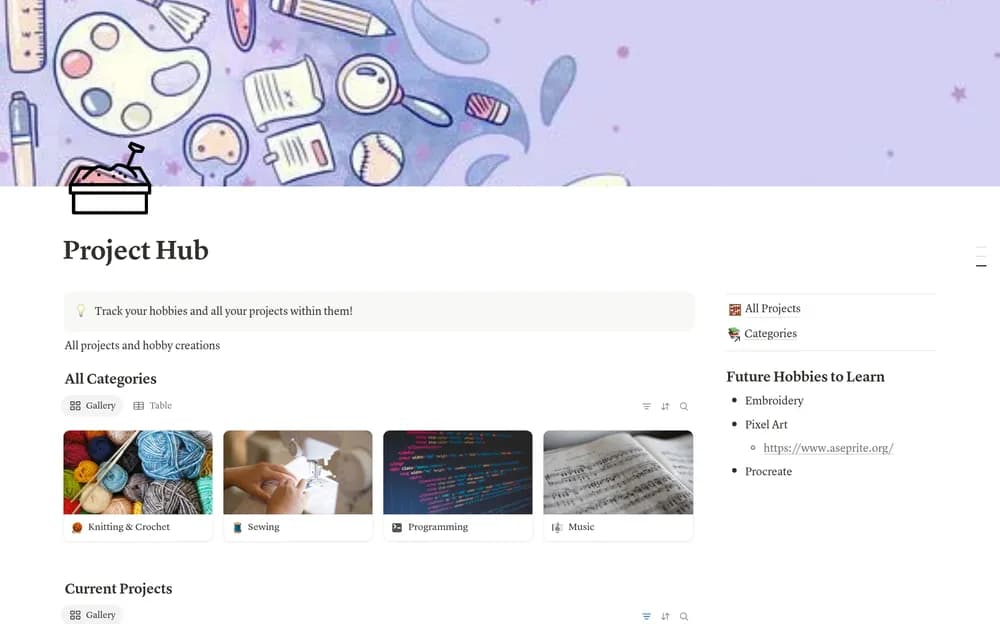
- A collection of hobbies and their status
- Space for current and future hobby projects
- Resources and links retained for each hobby
How to use it in practice
Choose one hobby project you would enjoy making progress on this month. Keep its next small step and the resources needed to begin in the same place. Save future possibilities without treating them as commitments. During a review, keep the record light enough that it supports the hobby rather than becoming another obligation.
Set it up in your workspace
- Open the original Notion Marketplace listing and add the template to your chosen workspace while signed in. Keep its example records until you understand how the pages connect.
- Add one project you want to continue and a small next step. Keep references and useful notes close to it.
- Try one complete example before adding a large backlog. Check that its views and any calculations show what you expect, then replace the sample content with your own.
Who it suits and what to consider
People making time for hobbies and creative projects. Useful for people with several interests and unfinished ideas. A small current-project view can make the collection easier to return to.