About Content Engine
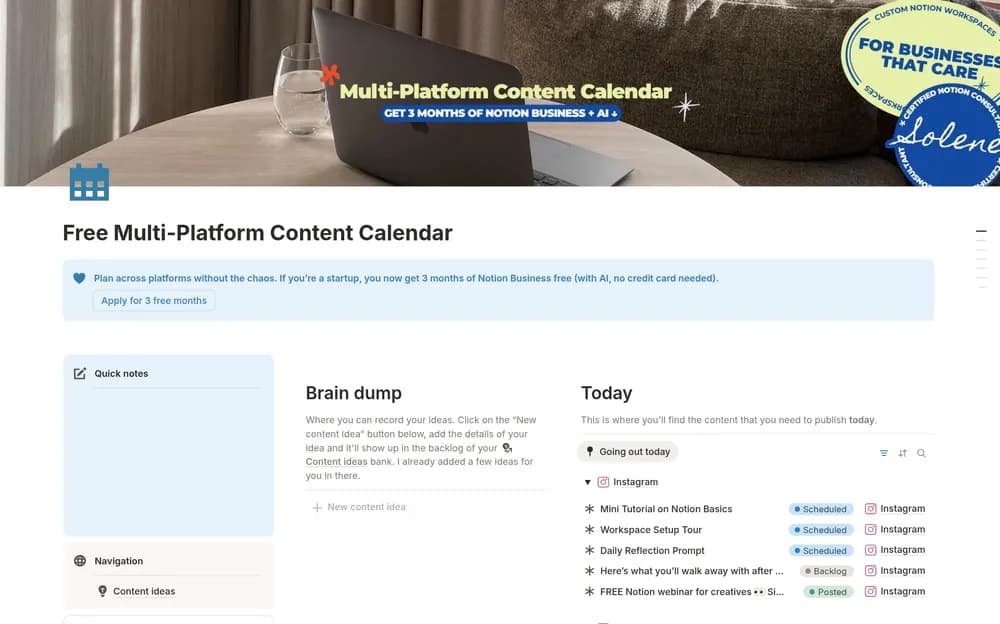
Solene Rauturier’s free Multi-Platform Content Calendar gives a publishing plan a shared home in Notion. It is an option for creators whose ideas need to become different pieces across several channels. Compare the preview with your production routine, especially how a draft, its assets, and its publication date stay together. A date on a calendar is only part of the work: you also need to notice what is waiting on research, editing, or approval. Try a few related pieces and check whether the layout keeps that unfinished work visible.
What’s included
- A content-idea bank
- An editorial calendar organized by platform and publication date
- Status tracking and a multi-platform view
How to use it in practice
Capture an idea with the audience question it answers, then give it a date only when you can commit to production. Keep unfinished copy and assets visible through the status field. Review the calendar by platform to see whether your plan is realistic across channels. After publishing, retain the final link so the record remains useful for future updates or adaptations.
Set it up in your workspace
- Open the original Notion Marketplace listing and add the template to your chosen workspace while signed in. Keep its example records until you understand how the pages connect.
- Plan three pieces for channels you already use. Give each a realistic publication date and record the work still needed before it can go live.
- Try one complete example before adding a large backlog. Check that its views and any calculations show what you expect, then replace the sample content with your own.
Who it suits and what to consider
Creators coordinating material for more than one channel. A lightweight choice for independent creators and small content operations. It focuses on a clear publishing routine, so compare specialized approval or analytics systems only if those are part of your process.