About Contract renewal & notice period tracker
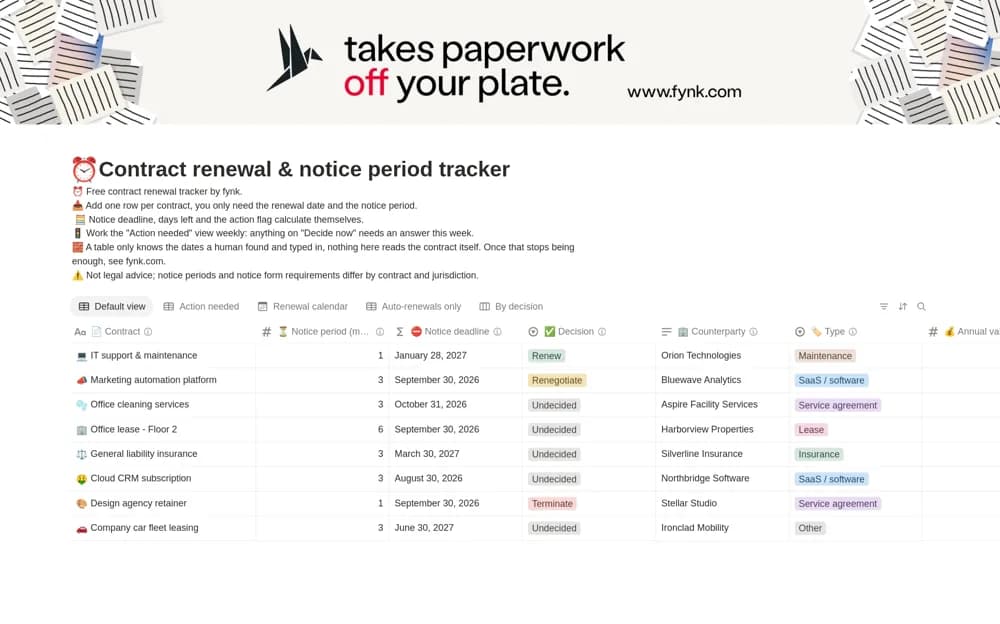
Track contract renewals in Notion with notice-period calculations, countdown flags, responsible owners, and views for renewal decisions.
What’s included
- Renewal dates and notice methods
- Calculated notice deadlines
- Thirty- and ninety-day flags
- Action, calendar, value, and decision views
How to use it in practice
Enter one agreement using the signed contract as your source. Confirm the renewal date, notice period, and required notice method, then check the calculated deadline by hand. Assign an owner and record the renewal decision early enough for that person to complete the actual notice process.
Set it up in your workspace
- Open the original Notion Marketplace listing and add the template to your chosen workspace while signed in. Keep its example records until you understand how the pages connect.
- Enter one agreement using the signed contract as your source.
- Try one complete example before adding a large backlog. Check that its views and any calculations show what you expect, then replace the sample content with your own.
Who it suits and what to consider
Operations, legal, and finance teams keeping contract notice deadlines visible. Formulas depend on accurate inputs and cannot interpret contract wording. Have the responsible reviewer confirm unusual notice or renewal provisions.