About Multi-Location Restaurant Location Performance
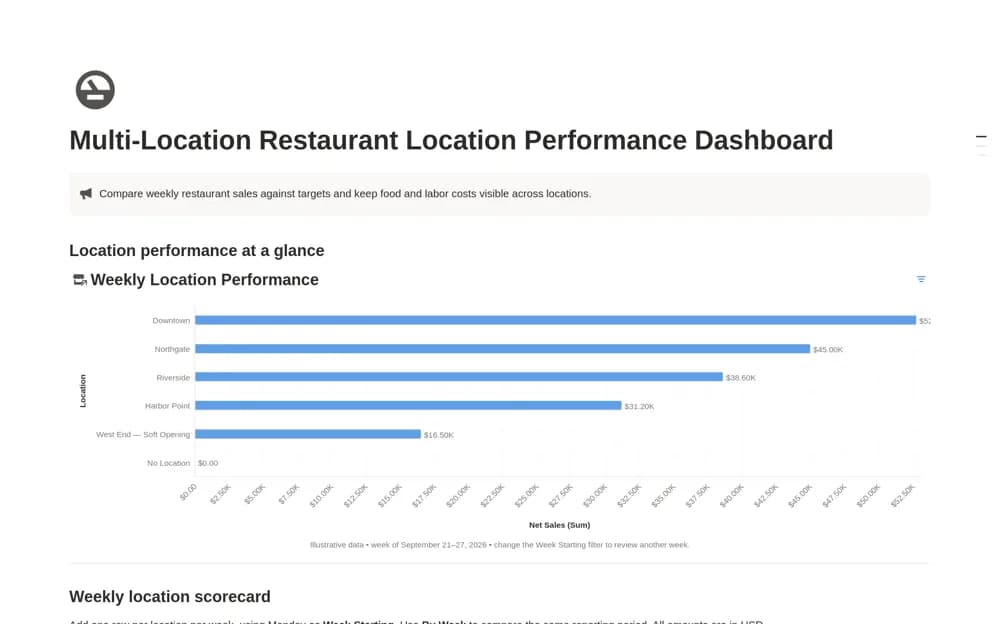
A weekly restaurant KPI dashboard recording location sales, targets, food cost, and labor cost, with target attainment and views comparing branches over a consistent period.
What’s included
- Weekly Location Performance records
- Net sales, targets, food cost, and labor cost
- Target Attainment calculation and location chart
How to use it in practice
Enter one week for each location using figures from the same reporting period. Check the sales target is positive before interpreting attainment, then set the chart to that week. Preserve prior records and add a note explaining any operational change that makes the comparison less straightforward.
Set it up in your workspace
- Open the original Notion Marketplace listing and add the template to your chosen workspace while signed in. Keep its example records until you understand how the pages connect.
- Enter one week for each location using figures from the same reporting period.
- Try one complete example before adding a large backlog. Check that its views and any calculations show what you expect, then replace the sample content with your own.
Who it suits and what to consider
Restaurant operators reviewing weekly performance across several locations. The supplied setup uses USD and a Monday week start. Adjust currency and definitions carefully, and keep the point-of-sale or finance system as the source of the actual figures.