About Freelancer Business OS
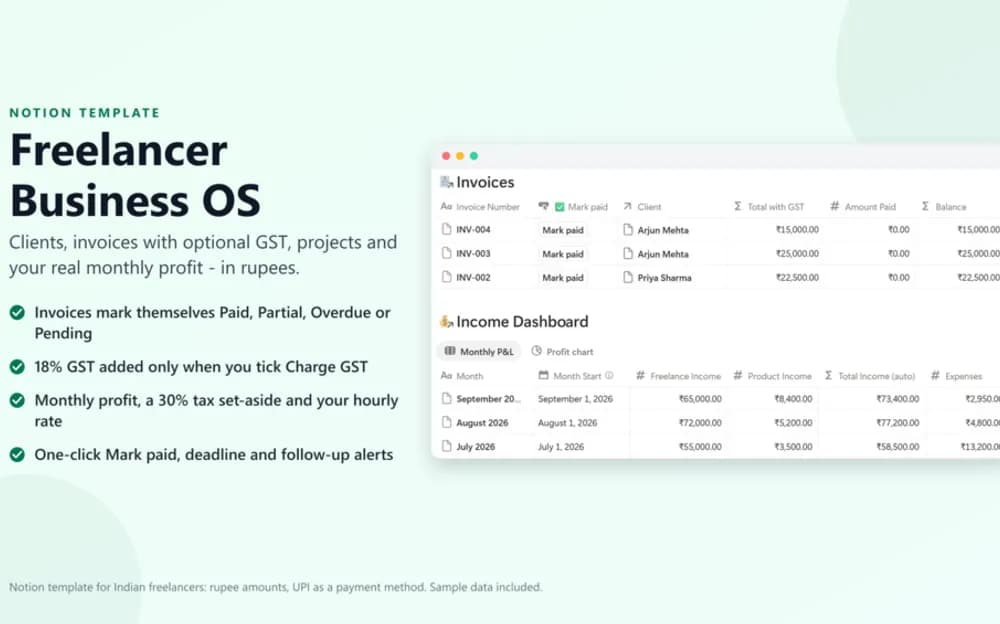
Manage a freelance practice in India from Notion, covering clients, proposals, projects, GST-ready invoices, expenses, and monthly profit.
What’s included
- Client CRM with follow-up alerts and a pipeline board
- Invoices with automatic paid, partial, overdue, or pending status
- Optional 18% GST and a one-click mark-paid button
- Monthly income dashboard with profit and a tax set-aside
- Proposals, expenses, and a content calendar
How to use it in practice
Add your current clients and any proposals still waiting for an answer. Create invoices for open work, ticking the GST option only if you are registered. Mark one invoice paid when money arrives to see the status update. At the end of the week, review projects due within three days and clients flagged for follow-up.
Set it up in your workspace
- Follow the original creator’s checkout or access instructions to obtain the Notion page. Open that page while signed in, then duplicate it into the workspace you want to use.
- Add your current clients and any proposals still waiting for an answer.
- Try one complete example before adding a large backlog. Check that its views and any calculations show what you expect, then replace the sample content with your own.
Who it suits and what to consider
Freelancers and solo consultants in India who bill clients in rupees. It is built around rupees, GST, and UPI payments, so freelancers elsewhere would need to adjust several fields. The 30% tax set-aside is a planning rule, not tax advice.