About Job Application Tracker
A job tracker should make the next step clear without requiring a long update. Use this creator’s layout to keep the role and your progress together. Add the original job description while you can still access it, and keep interview context beside the relevant application.
What’s included
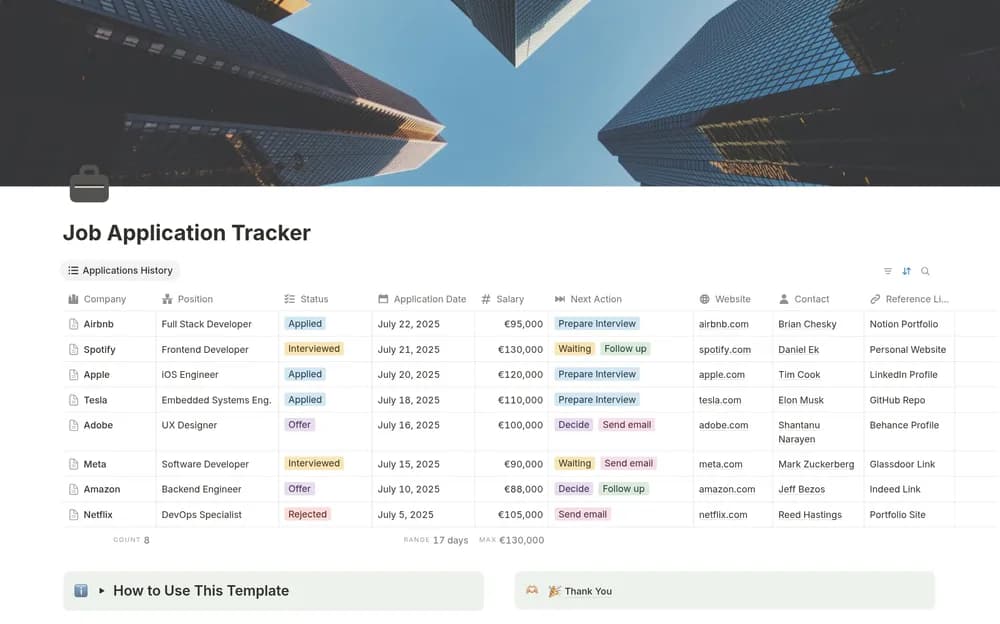
- Company, position, salary-expectation, recruiter, and contact context
- Application stages including applied, interviewed, offer, and rejected
- A next-action field, status board, and reusable job-entry template
How to use it in practice
Add current applications and preserve the job description link while it is available. Record the next action with its context, such as a requested task or interview preparation. Review the board alongside your email to keep stage changes current. Close unsuccessful or withdrawn applications while retaining notes that may help the next search.
Set it up in your workspace
- Open the original Notion Marketplace listing and add the template to your chosen workspace while signed in. Keep its example records until you understand how the pages connect.
- Enter your active applications and a specific next action for each. Choose a regular time to review the list.
- Try one complete example before adding a large backlog. Check that its views and any calculations show what you expect, then replace the sample content with your own.
Who it suits and what to consider
Job seekers keeping several opportunities moving. A useful choice when you want the next step visible for every application. Keep salary expectations and confirmed offers clearly distinguishable.