About Contact List (Personal CRM)
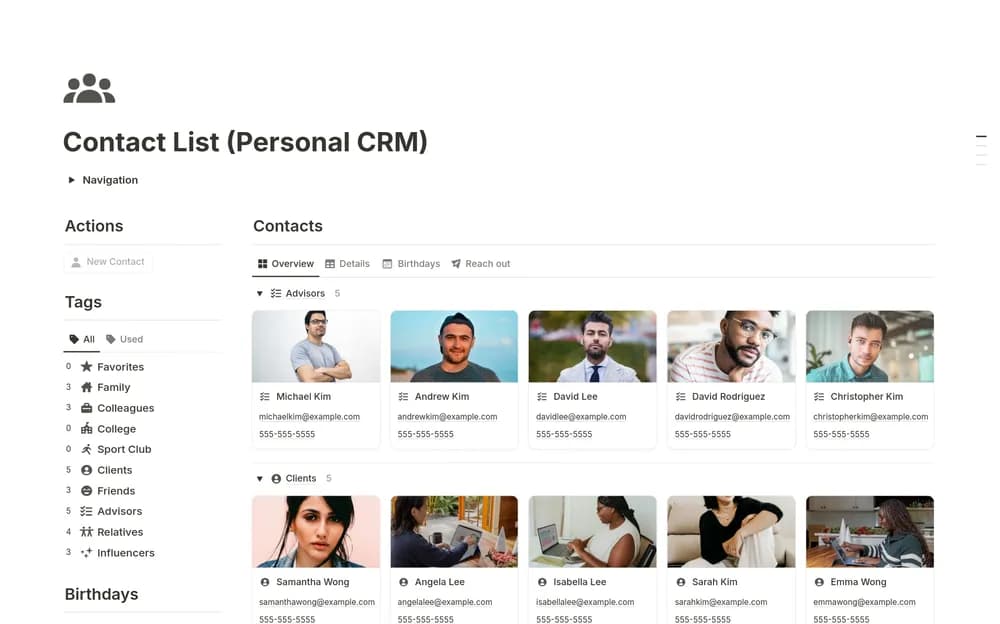
A personal CRM can hold the details that make a future conversation easier. Keep the record respectful and limited to information you need. Check the creator’s layout for how contacts and follow-ups are organized, then decide on a review routine you can maintain.
What’s included
- Personal contact records
- Follow-up organization
- Notes for relationship context, birthdays, and relevant preferences
How to use it in practice
Start with the people you actively want to keep in touch with. Record a useful conversation note and a natural next step, keeping the entry respectful and concise. Review the list at a realistic interval and remove details that no longer serve a purpose. Use the record to make contact easier, not to create a maintenance burden.
Set it up in your workspace
- Open the original Notion Marketplace listing and add the template to your chosen workspace while signed in. Keep its example records until you understand how the pages connect.
- Add a few contacts you actively keep in touch with. Record a useful next step instead of filling every field.
- Try one complete example before adding a large backlog. Check that its views and any calculations show what you expect, then replace the sample content with your own.
Who it suits and what to consider
People who want a more useful contact list. Useful when a standard address book loses the context of a relationship. Keep access private if notes include personal information.