About Lesson Plan Organizer
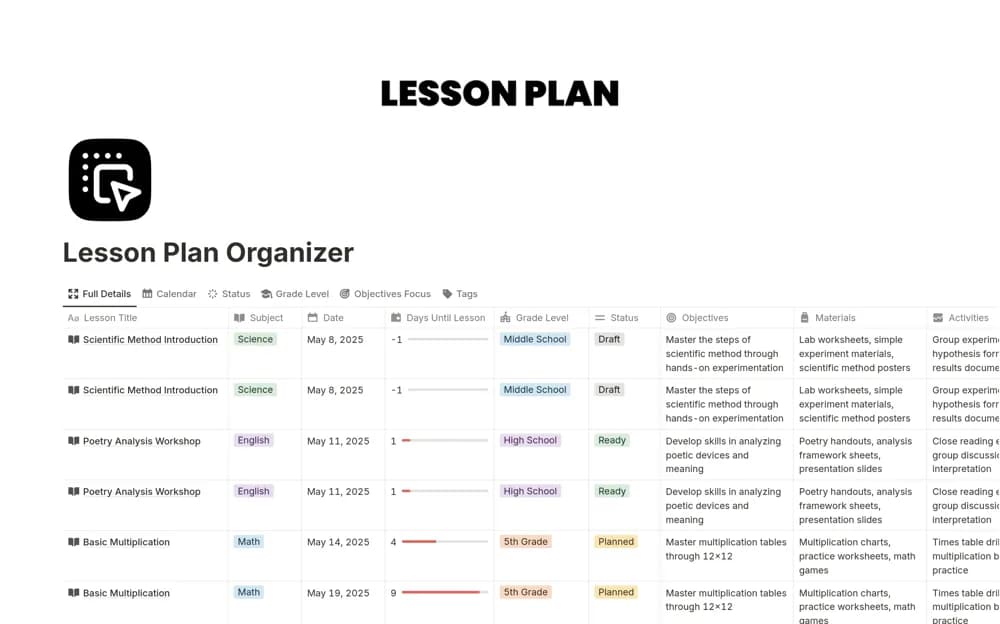
A reusable lesson-planning system with objectives, materials, feedback, and calendar, board, and list views for reviewing the same teaching work in different ways.
What’s included
- Detailed lesson pages
- Learning objectives, materials, and feedback
- Calendar, board, and list views
How to use it in practice
Create a lesson you will teach soon and add its objective and required materials before filling the calendar. After teaching, capture one useful observation in the feedback area. Reuse the lesson later with those notes visible rather than treating every session as a new document.
Set it up in your workspace
- Open the original Notion Marketplace listing and add the template to your chosen workspace while signed in. Keep its example records until you understand how the pages connect.
- Create a lesson you will teach soon and add its objective and required materials before filling the calendar.
- Try one complete example before adding a large backlog. Check that its views and any calculations show what you expect, then replace the sample content with your own.
Who it suits and what to consider
Teachers and tutors building a lesson library across subjects or grade levels. The listing emphasizes lesson organization. It does not confirm an attendance register, a gradebook, or a connection to a school learning-management system.