About Music Student Progress Tracker
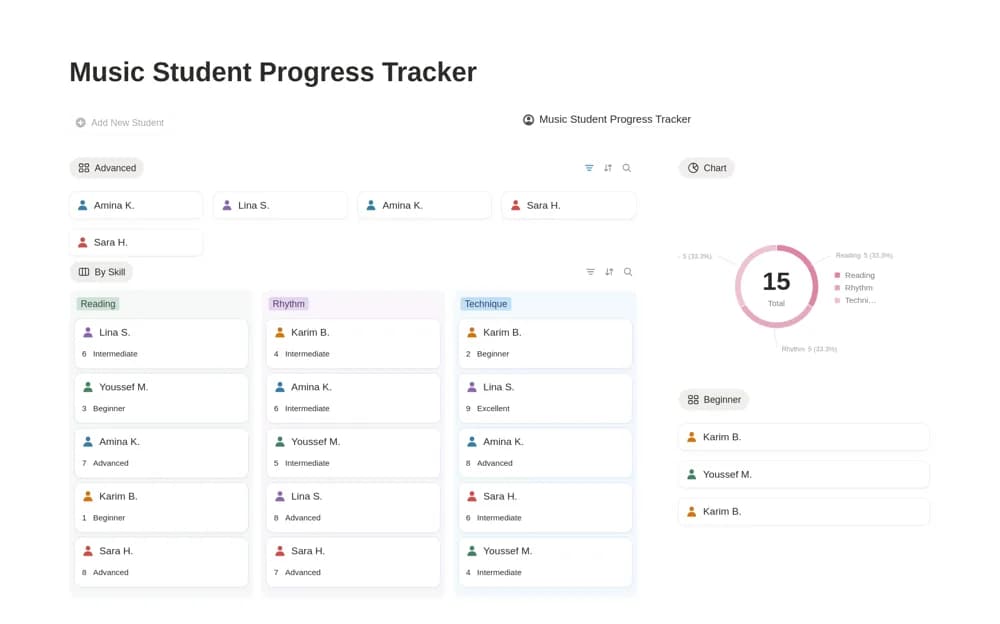
A music-teaching assessment tracker with scores for technique, rhythm, and reading, student and skill views, and calculated progress levels.
What’s included
- Technique, rhythm, and reading scores
- Student and skill grouping
- One-to-ten ratings and calculated progress levels
How to use it in practice
Record a short baseline assessment for one learner and explain what each score means in your teaching context. Revisit the same skill after a few lessons and add observations that explain any change. Use the grouped views to choose a useful focus for the next session.
Set it up in your workspace
- Open the original Notion Marketplace listing and add the template to your chosen workspace while signed in. Keep its example records until you understand how the pages connect.
- Record a short baseline assessment for one learner and explain what each score means in your teaching context.
- Try one complete example before adding a large backlog. Check that its views and any calculations show what you expect, then replace the sample content with your own.
Who it suits and what to consider
Music teachers and tutors keeping a more consistent record of a learner’s development. A numeric rating supports your notes; it does not establish an accredited examination grade or make performance judgments objective without consistent assessment criteria.