About My Anime List
A personal anime list can make a growing watch queue easier to navigate. Use the template to separate what you are watching from what you have finished or only want to try. Add the notes you enjoy revisiting and keep the update routine light.
What’s included
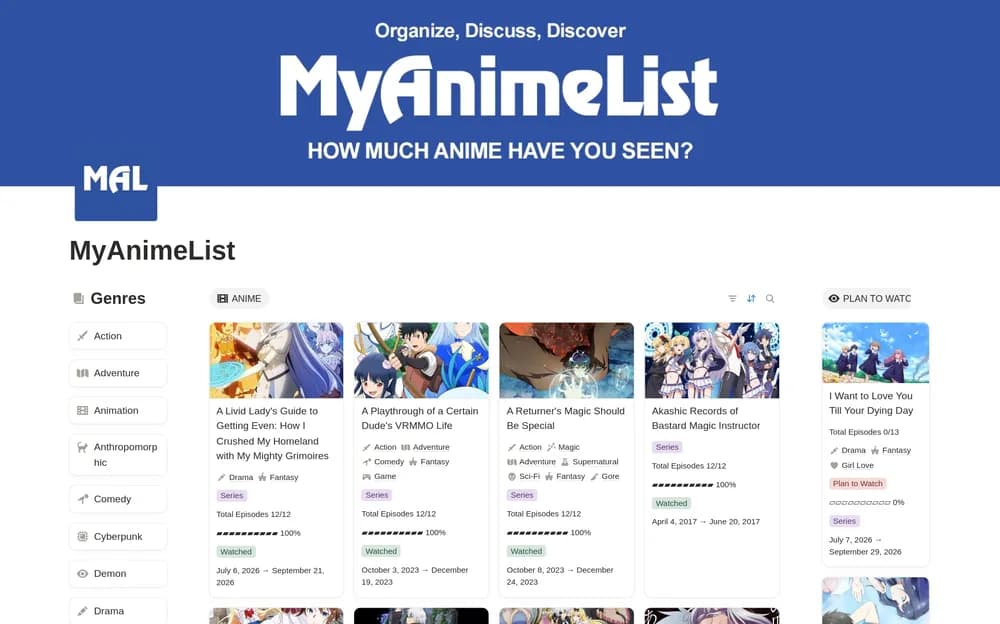
- Anime records organized as planned, watching, or completed
- Episode-progress tracking
- Ratings and genre-based sorting
How to use it in practice
Add the series you are currently watching and record the last episode completed. Keep the planned list short enough to browse when choosing what comes next. After finishing a series, add a brief reason for the rating so the record remains useful. Distinguish seasons or specials consistently to avoid losing your place.
Set it up in your workspace
- Open the original Notion Marketplace listing and add the template to your chosen workspace while signed in. Keep its example records until you understand how the pages connect.
- Add a few current and upcoming shows. Pick a short next-up list you can actually use.
- Try one complete example before adding a large backlog. Check that its views and any calculations show what you expect, then replace the sample content with your own.
Who it suits and what to consider
Anime fans organizing what to watch. A focused personal watchlist for anime. Viewing progress depends on the entries you maintain unless you configure a separate service connection.