About Notion Aesthetic Free Watchlist Tracker
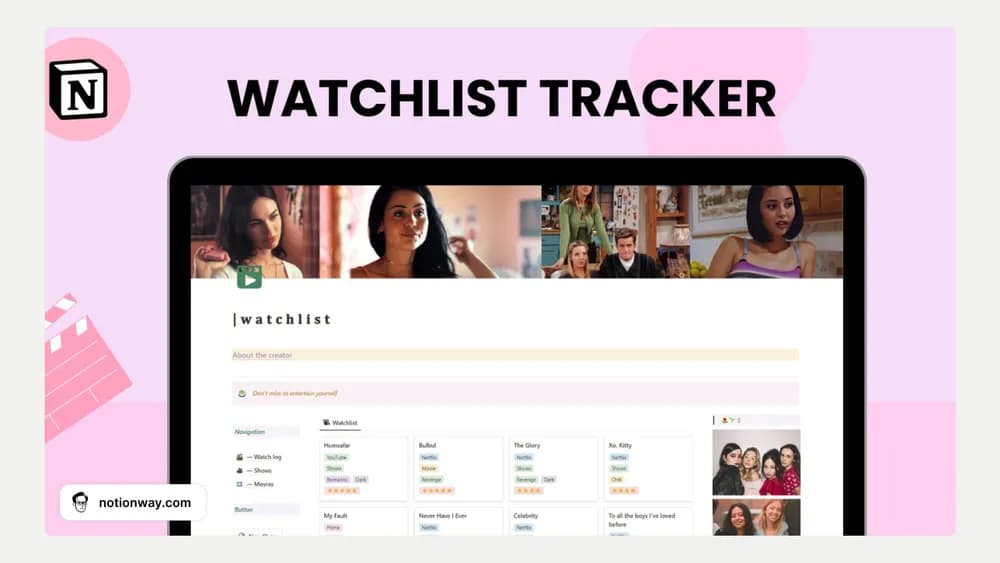
A watchlist is most useful when it helps you choose something for tonight. This tracker gives films and shows a visual home in Notion. Separate what you plan to watch from what you have finished so the list stays useful as it grows.
What’s included
- Separate organization for movies and shows
- Editable viewing statuses, categories, and ratings
- A button for adding a new watchlist entry
How to use it in practice
Add a handful of titles you are genuinely likely to watch, then distinguish pending, watching, and completed items. Use a genre or platform only if it helps you choose something later. After finishing a title, leave a short note about what you enjoyed. Review the backlog occasionally so an old recommendation does not crowd out the few shows you still care about.
Set it up in your workspace
- Follow the original creator’s checkout or access instructions to obtain the Notion page. Open that page while signed in, then duplicate it into the workspace you want to use.
- Add the next five films or shows you are considering. Record a brief personal note when you finish one.
- Try one complete example before adding a large backlog. Check that its views and any calculations show what you expect, then replace the sample content with your own.
Who it suits and what to consider
People who want one place for viewing plans. Useful for a personal entertainment library with ratings. The creator describes organization and status tracking, so treat streaming availability as something to check separately.