About Repeating Weekly Meal Planner
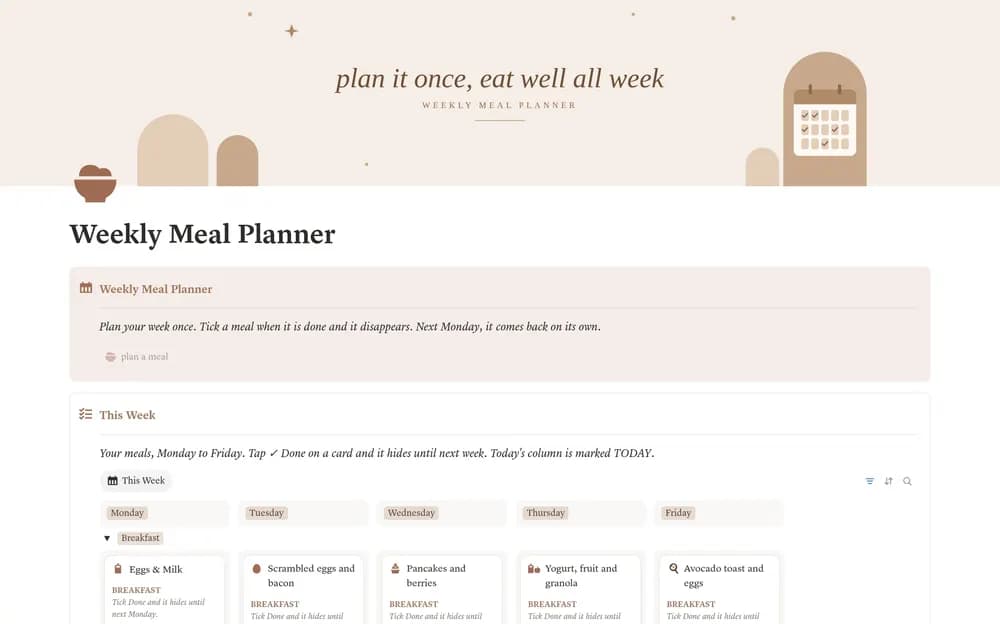
Set weekday breakfasts, lunches, and dinners once in Notion; tick each meal as done and the board puts every meal back in place the next Monday.
What’s included
- This Week board with a column per weekday split into breakfast, lunch, and dinner
- Done button that hides a meal until next week
- TODAY tag on the current day’s column
- Done This Week list with Undo
- How-to guides for moving meals, repeats, weekends, and stopping a repeat
How to use it in practice
Clear the sample meals using the on-page steps, then add the meals you usually eat with the Add a meal button. Through the week, tap Done after each meal and use Undo if you tick one by mistake. Try moving one meal to a different day using the guide. On Monday, confirm the board has reset itself before deciding whether the routine suits you.
Set it up in your workspace
- Open the original Notion Marketplace listing and add the template to your chosen workspace while signed in. Keep its example records until you understand how the pages connect.
- Clear the sample meals using the on-page steps, then add the meals you usually eat with the Add a meal button.
- Try one complete example before adding a large backlog. Check that its views and any calculations show what you expect, then replace the sample content with your own.
Who it suits and what to consider
People and families who eat roughly the same meals each week and abandoned planners that needed rebuilding. The board covers Monday to Friday by default, and weekends are added by following a guide. The listing does not mention a grocery list or recipe storage.