About SaaS SOP Hub
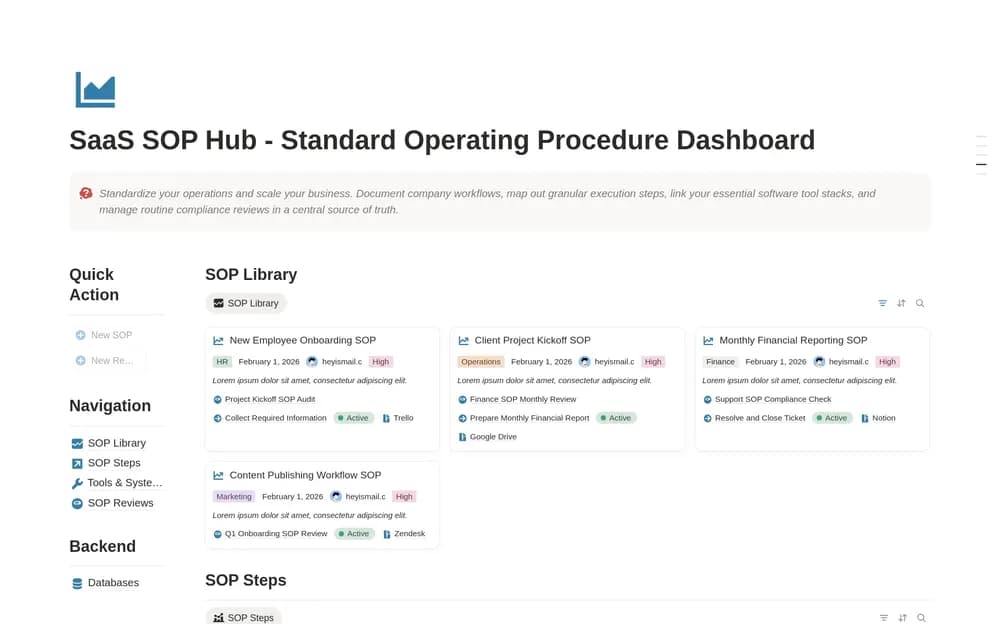
Document a SaaS company’s procedures in Notion, linking master playbooks to step cards, team roles, the tools each process uses, and risk labels.
What’s included
- Master SOP playbook library
- Step-by-step action board with checklists and role owners
- Tool and software stack linked to procedures
- Department and role filters
- Priority, risk, and audit-deadline tracking
How to use it in practice
Pick one process that only you currently know, such as customer onboarding, and write it as a master SOP. Break it into step cards with checklists and assign each to a role. Link the tools involved, then ask a teammate to follow it this week and record where they got stuck.
Set it up in your workspace
- Open the original Notion Marketplace listing and add the template to your chosen workspace while signed in. Keep its example records until you understand how the pages connect.
- Pick one process that only you currently know, such as customer onboarding, and write it as a master SOP.
- Try one complete example before adding a large backlog. Check that its views and any calculations show what you expect, then replace the sample content with your own.
Who it suits and what to consider
SaaS founders and operations leads who want team processes documented outside their own heads. Procedures still have to be written by your team; the hub provides structure and links, and the listing does not describe automation that runs the processes.