About Sales CRM & Pipeline OS
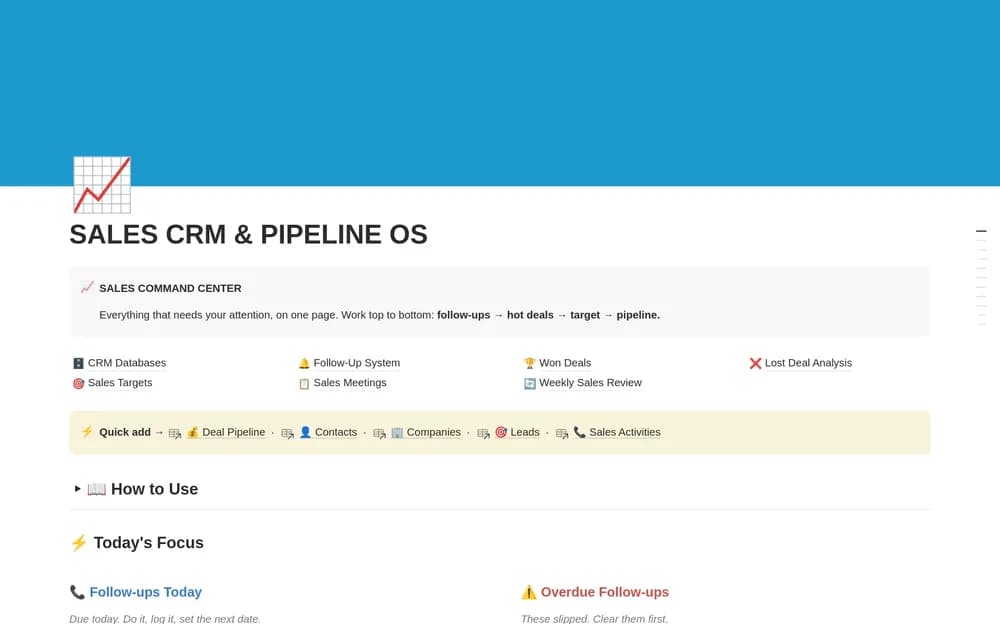
Track companies, contacts, leads, and deals in a Notion sales CRM with stage probabilities, expected revenue, follow-up views, and monthly targets.
What’s included
- Sales command center with today’s and overdue follow-ups, hot opportunities, and pipeline value
- Companies, contacts, leads, and a seven-stage deal pipeline with automatic probability and expected revenue
- Activity log that updates each deal’s last-activity date
- Monthly targets with gap, forecast, and status
- Won and lost deal analysis, a meeting agenda, and a weekly sales review
How to use it in practice
Replace the samples with one real company, its contacts, and an open deal. Log each call or email during the week so last-activity dates update, and move deals between stages as they progress. Set a monthly target, then use the weekly review on Friday to check the forecast and any deals flagged as stuck.
Set it up in your workspace
- Open the original Notion Marketplace listing and add the template to your chosen workspace while signed in. Keep its example records until you understand how the pages connect.
- Replace the samples with one real company, its contacts, and an open deal.
- Try one complete example before adding a large backlog. Check that its views and any calculations show what you expect, then replace the sample content with your own.
Who it suits and what to consider
Startups, agencies, consultants, and small sales teams that want a CRM on Notion’s free plan. Everything is entered by hand; the creator states there are no automations, so emails and meetings are not captured from other tools. Stage probabilities may need adjusting for your own sales cycle.