About Teaching Week Dashboard
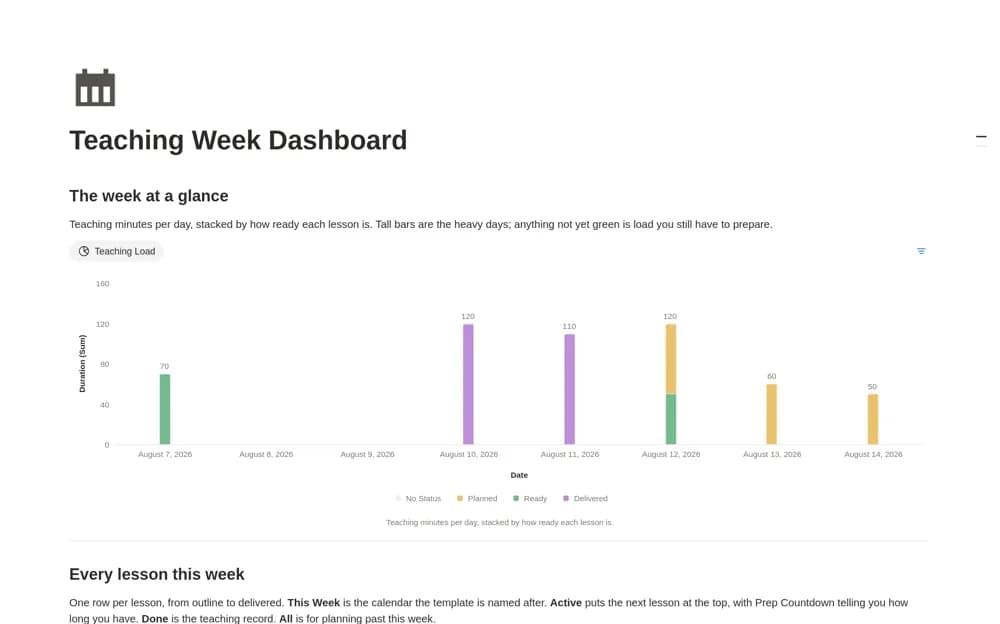
A weekly teaching dashboard showing session duration, preparation status, and the time left before each lesson, with a chart of teaching load by day.
What’s included
- Lessons with class, date, duration, and objective
- Planned, Ready, and Delivered stages
- Teaching Load chart and Prep Countdown
How to use it in practice
Enter next week’s lessons with realistic durations, then check the busiest day for sessions that are still unprepared. Keep each plan inside its lesson page and move it to Ready only when you could teach from the materials already there.
Set it up in your workspace
- Open the original Notion Marketplace listing and add the template to your chosen workspace while signed in. Keep its example records until you understand how the pages connect.
- Enter next week’s lessons with realistic durations, then check the busiest day for sessions that are still unprepared.
- Try one complete example before adding a large backlog. Check that its views and any calculations show what you expect, then replace the sample content with your own.
Who it suits and what to consider
Teachers balancing several classes and deciding which lessons need preparation first. The countdown depends on the lesson dates you enter. The chart helps prioritize preparation, but it cannot judge whether the lesson content is appropriate for a class.