About Uni To-Do List
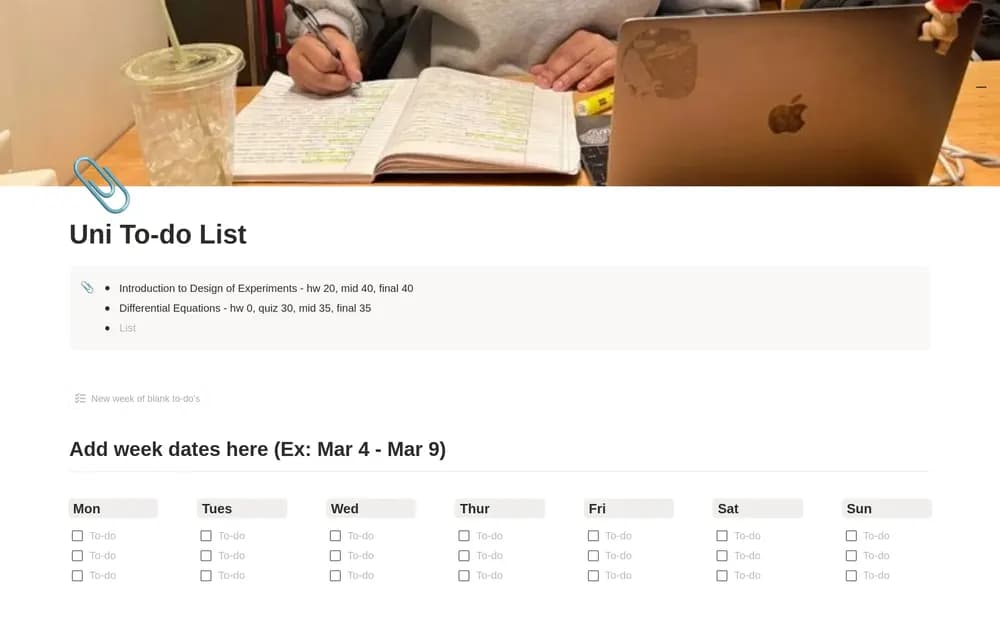
Plan a university week in Notion with a Monday-to-Sunday checklist, course notes at the top, and a button that adds a fresh blank week.
What’s included
- Monday-to-Sunday task layout
- Button that creates a new blank week
- Notes area for courses, grading breakdowns, and deadlines
- Checkbox tasks in a minimal, editable design
How to use it in practice
Enter this week’s dates and add each assignment, study block, and meeting under the day it belongs to. Put your current courses and their grading weights in the notes area. Check items off as you finish them, then use the new-week button on Sunday and note which unfinished tasks you need to copy forward.
Set it up in your workspace
- Open the original Notion Marketplace listing and add the template to your chosen workspace while signed in. Keep its example records until you understand how the pages connect.
- Enter this week’s dates and add each assignment, study block, and meeting under the day it belongs to.
- Try one complete example before adding a large backlog. Check that its views and any calculations show what you expect, then replace the sample content with your own.
Who it suits and what to consider
University students who prefer a plain weekly checklist to a database-heavy dashboard. The listing describes checkbox tasks rather than a database, so there are no due-date filters or reminders, and unfinished items move to the next week only if you copy them.