About Video Game Library for Notion
A game library can make it easier to see what you own and what you want to play next. This creator’s template offers a Notion-based home for that collection. Start with the information you actually use when choosing a game, rather than cataloging every possible detail.
What’s included
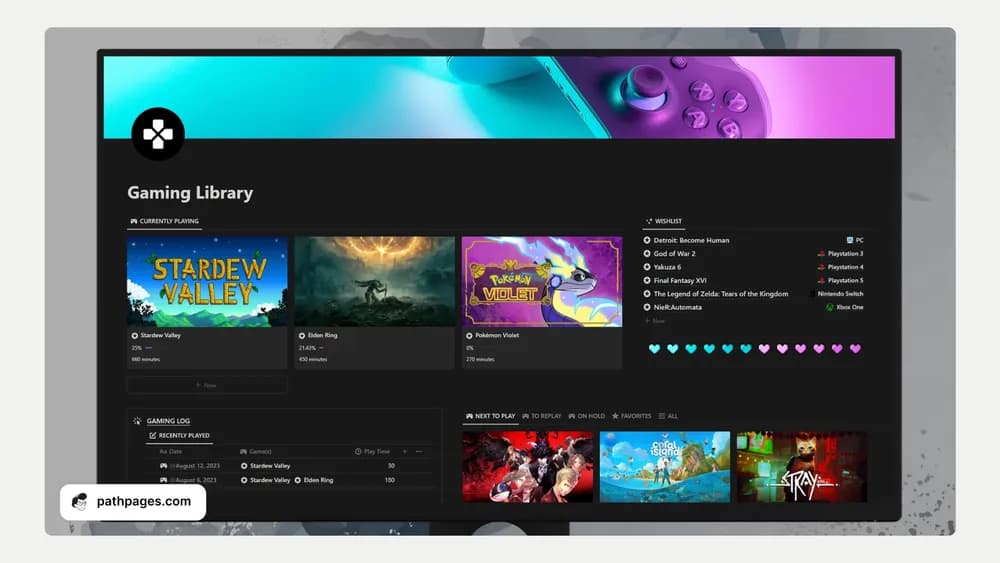
- Game-library and platform databases, plus a wishlist
- A gaming log recording when, how long, and what you last played
- Backlog, next-up, replay, current, completed, and achievement-progress organization
How to use it in practice
Add the games you are actively playing before importing a whole collection. After a session, leave a short note about where you stopped and what to do next. Use the platform view to avoid buying a game you already own elsewhere. Keep the next-up list small so the library helps you choose a game instead of making leisure feel like unfinished work.
Set it up in your workspace
- Follow the original creator’s checkout or access instructions to obtain the Notion page. Open that page while signed in, then duplicate it into the workspace you want to use.
- Add a few current games and choose a status for each. Keep a short next-up list you can realistically return to.
- Try one complete example before adding a large backlog. Check that its views and any calculations show what you expect, then replace the sample content with your own.
Who it suits and what to consider
Players who want a more organized game library. Useful for players who want session context as well as a collection. Playtime and achievements depend on what you record unless a separate integration is explicitly configured.