About Volunteer Activity Log
A log becomes useful when entries mean the same thing across the team. This template provides a place for volunteer activity. Decide what needs to be recorded, who will update it, and how private participant details should be handled before collecting a large history.
What’s included
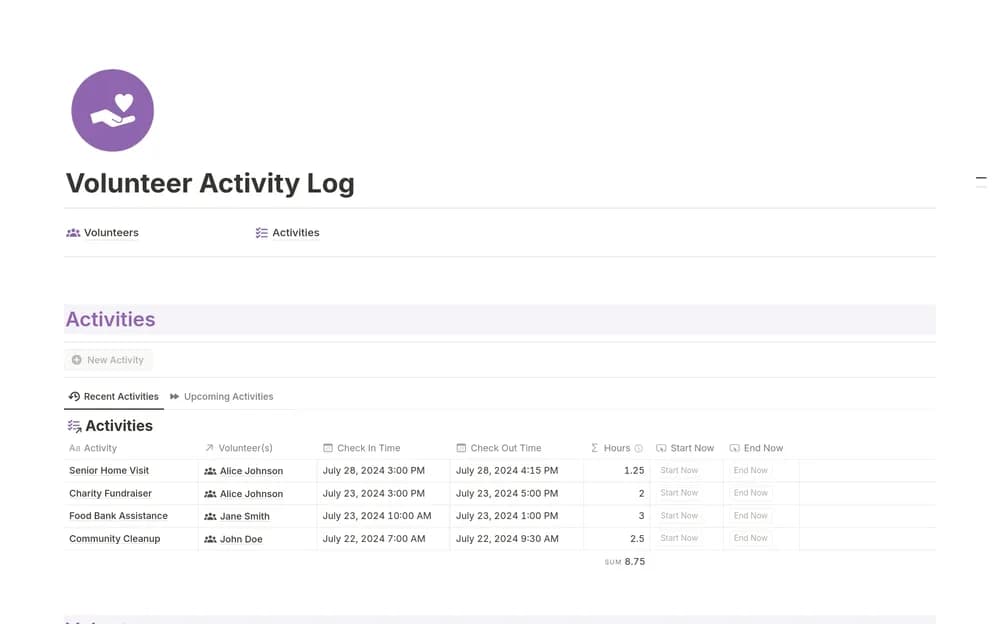
- A Volunteers database for profiles
- An Activities database for contributions
- Linked records for keeping volunteer and activity context together
How to use it in practice
Create a sample volunteer and a completed activity, then check how they connect. Use one consistent convention for recording time and describing the work. Review entries with the coordinator before using them in a report. Keep the log current after each event so missing details do not have to be reconstructed weeks later.
Set it up in your workspace
- Open the original Notion Marketplace listing and add the template to your chosen workspace while signed in. Keep its example records until you understand how the pages connect.
- Record a sample activity and define the fields your team needs. Choose who will maintain the log.
- Try one complete example before adding a large backlog. Check that its views and any calculations show what you expect, then replace the sample content with your own.
Who it suits and what to consider
Organizations coordinating volunteer work. A focused option for volunteer coordination and contribution records. Agree on how entries are reviewed if the organization uses them for formal reporting.