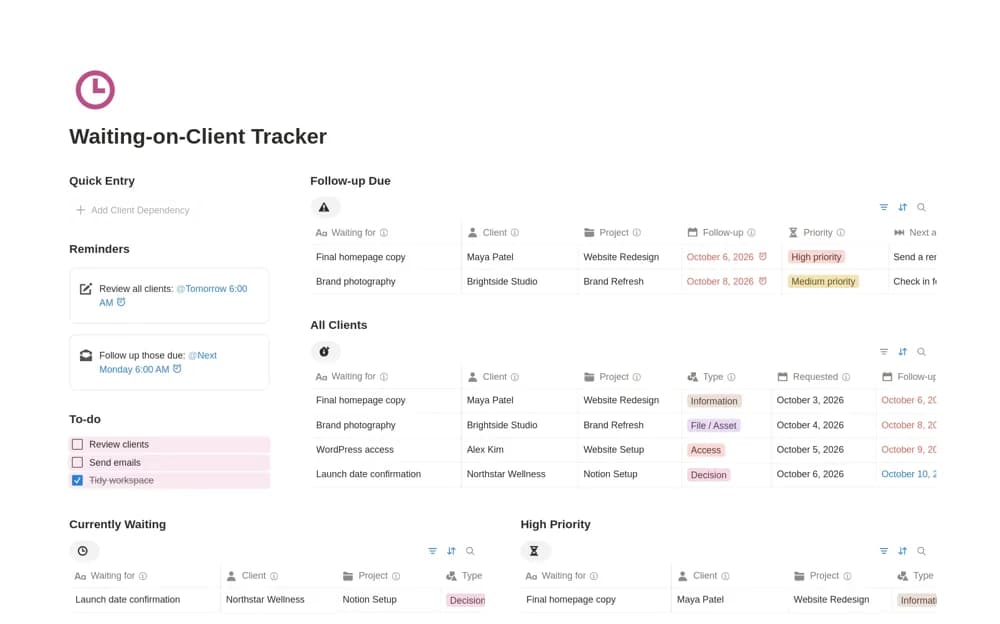
About Waiting-on-Client Tracker
A client dependency tracker for missing assets, feedback, approvals, access, payments, and clear follow-up actions.
What’s included
- Client, project, and dependency-type fields
- Requested and follow-up dates
- Priority, next action, and a Waiting-to-Closed status workflow
How to use it in practice
Enter only requests that block or materially affect work. Record what you asked for, who owes it, and the next useful follow-up. Review the list before promising delivery dates and close items when received or genuinely no longer needed.
Set it up in your workspace
- Open the original Notion Marketplace listing and add the template to your chosen workspace while signed in. Keep its example records until you understand how the pages connect.
- Enter only requests that block or materially affect work.
- Try one complete example before adding a large backlog. Check that its views and any calculations show what you expect, then replace the sample content with your own.
Who it suits and what to consider
Freelancers who regularly wait on client input before work can move forward. The tracker records dependencies; it does not send reminders or change contractual responsibilities unless separately configured.