About Your Recipe Book
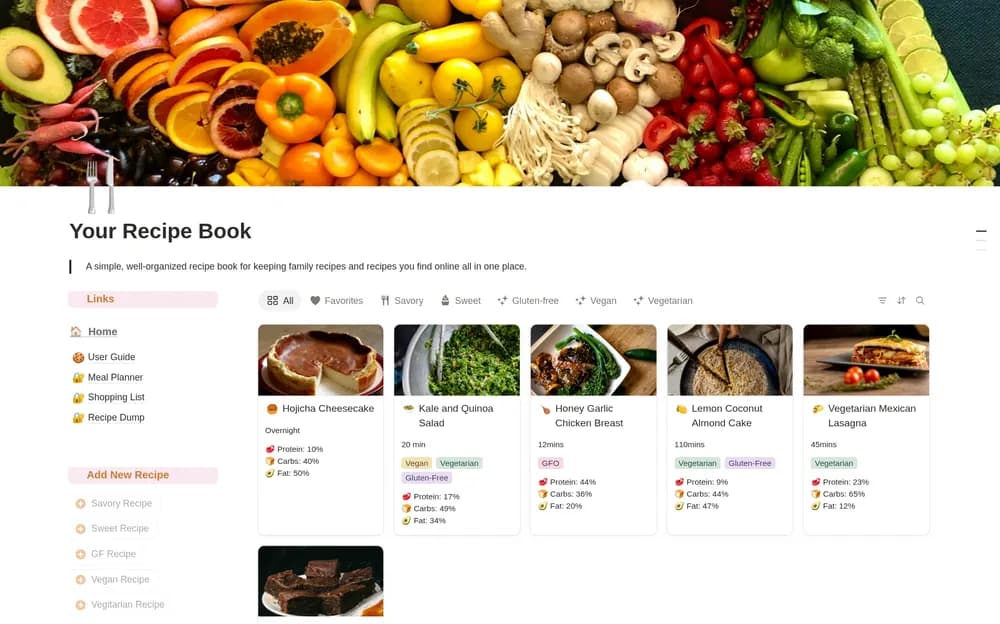
Store family and online recipes in a Notion recipe book that sorts each dish into savory, sweet, vegan, vegetarian, gluten-free, or favorites.
What’s included
- All-recipes view
- Favorites section
- Savory and sweet sections
- Gluten-free, vegan, and vegetarian sections
- Automatic grouping based on recipe details
How to use it in practice
Enter three recipes you cook often and one you found online, filling in the details that drive the grouping. Open each section to confirm the recipes landed where you expected. Mark your favorites, and use the book for one week’s dinners to see whether the categories help you choose.
Set it up in your workspace
- Open the original Notion Marketplace listing and add the template to your chosen workspace while signed in. Keep its example records until you understand how the pages connect.
- Enter three recipes you cook often and one you found online, filling in the details that drive the grouping.
- Try one complete example before adding a large backlog. Check that its views and any calculations show what you expect, then replace the sample content with your own.
Who it suits and what to consider
Home cooks who want a straightforward, automatically grouped recipe collection. Grouping depends on the details you enter, and the listing does not mention meal planning, shopping lists, or recipe importing.