About YouTube Channel Creator Revenue Dashboard
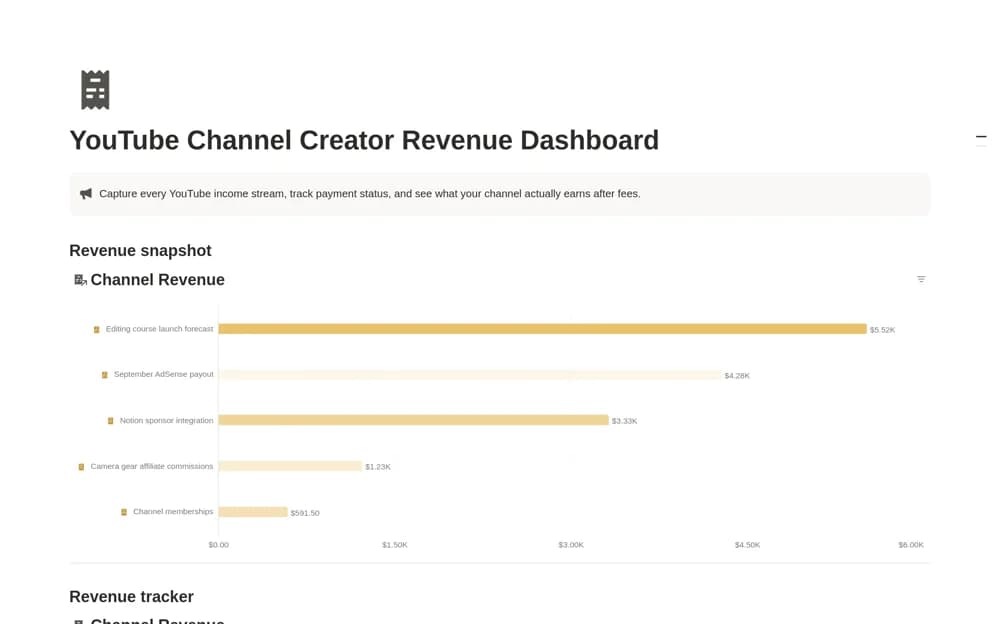
A creator income dashboard recording gross revenue, fees, dates, owners, and payment status, with a net-revenue calculation and an entry-level comparison view.
What’s included
- Channel Revenue database
- Gross-minus-fees Net Revenue formula
- Forecast, Pending, and Received statuses
How to use it in practice
Enter a payment already received and verify the net amount against its actual fee record. Add a forecast item separately and check that its status remains obvious in the overview. Review the same reporting period each time so changes in recorded income are not simply the result of different date ranges.
Set it up in your workspace
- Open the original Notion Marketplace listing and add the template to your chosen workspace while signed in. Keep its example records until you understand how the pages connect.
- Enter a payment already received and verify the net amount against its actual fee record.
- Try one complete example before adding a large backlog. Check that its views and any calculations show what you expect, then replace the sample content with your own.
Who it suits and what to consider
YouTubers and small creator businesses tracking income from forecast to actual receipt. The calculation subtracts recorded fees and does not represent every business cost. The listing does not establish automatic YouTube, sponsorship, or bank imports.