About ADHD Widgets: Calm Daily Tools
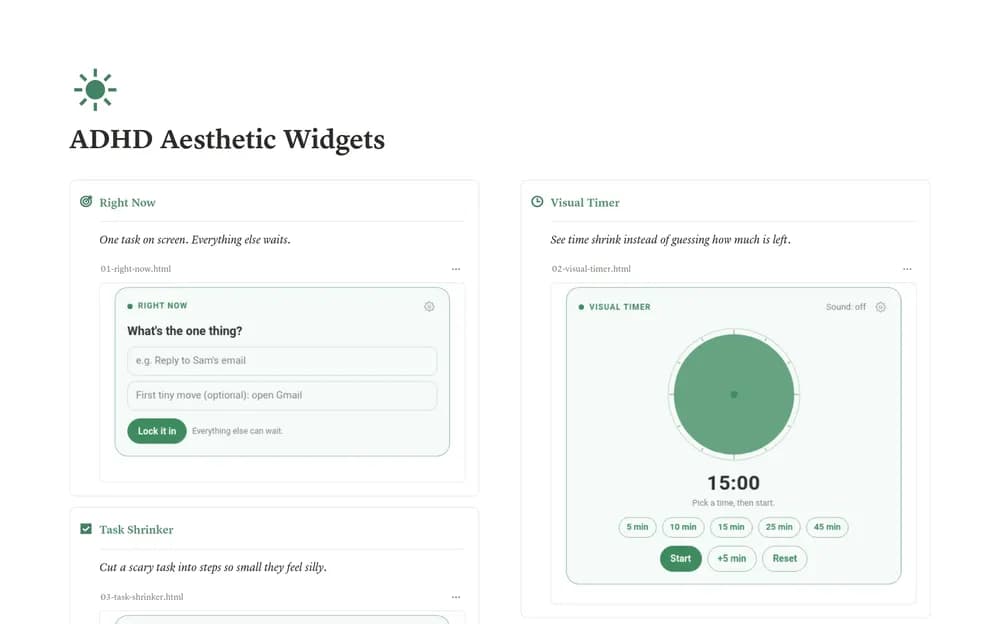
Get through stuck moments with ten Notion widgets, including a single-task focus view, visual timer, task shrinker, dopamine menu, and leave-by planner.
What’s included
- Right Now single-task view and visual timer
- Task Shrinker and Brain Parking Lot
- Daily Basics and Out the Door checklists
- Leave By planner and Last Done tracker
- Dopamine Menu and Ta-da List with a seven-day view
How to use it in practice
Choose two widgets for the moments you most often get stuck, such as starting a task or leaving on time. Use the visual timer and Task Shrinker for one hard task each day. Record what you finish in the Ta-da List, and at the end of the week check which widgets you actually reached for.
Set it up in your workspace
- Open the original Notion Marketplace listing and add the template to your chosen workspace while signed in. Keep its example records until you understand how the pages connect.
- Choose two widgets for the moments you most often get stuck, such as starting a task or leaving on time.
- Try one complete example before adding a large backlog. Check that its views and any calculations show what you expect, then replace the sample content with your own.
Who it suits and what to consider
People with ADHD, or anyone who struggles with focus, time blindness, and daily routines. The creator says data is stored in the browser of each device, so phone and laptop keep separate copies and nothing syncs. It is built for everyday focus, not as a medical tool.