About Personal Productivity OS
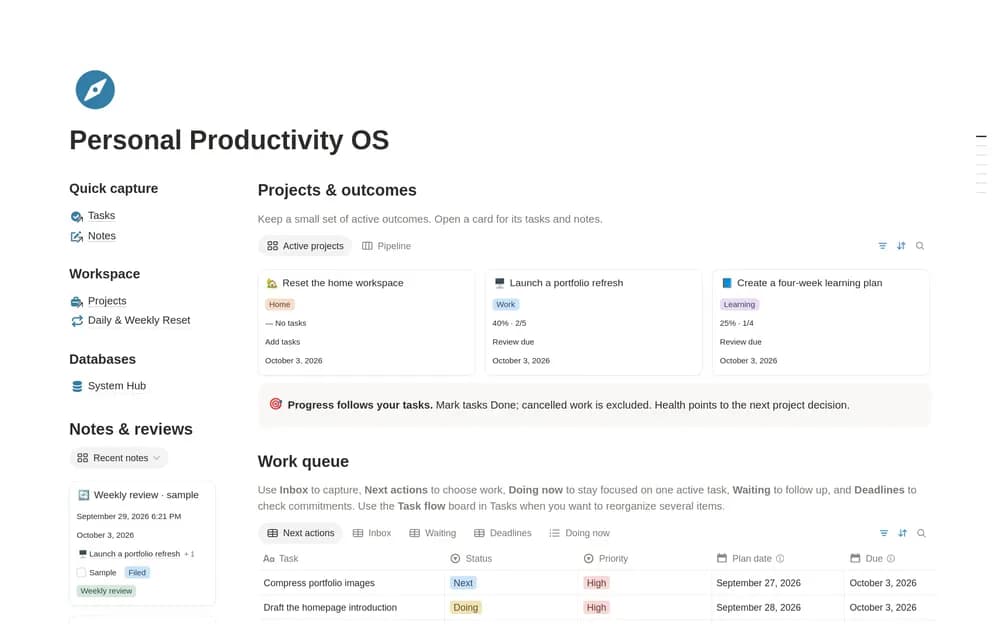
Bring tasks, projects, notes, schedules, and weekly reviews into one Notion system with quick capture, a work queue, and a daily and weekly reset.
What’s included
- Quick Capture for tasks and notes
- Projects and Outcomes dashboard with progress and review dates
- Work Queue sorting tasks into Inbox, Next Actions, Waiting, Doing Now, and Deadlines
- Schedule that separates planned work dates from deadlines
- Notes and Reviews with a daily and weekly reset
How to use it in practice
Spend ten minutes capturing every open task and idea through Quick Capture. Group them under two or three active projects and give each project an outcome. Use the Work Queue to choose what to do next each day, and run the weekly reset on Friday to clear the inbox and adjust priorities.
Set it up in your workspace
- Open the original Notion Marketplace listing and add the template to your chosen workspace while signed in. Keep its example records until you understand how the pages connect.
- Spend ten minutes capturing every open task and idea through Quick Capture.
- Try one complete example before adding a large backlog. Check that its views and any calculations show what you expect, then replace the sample content with your own.
Who it suits and what to consider
Professionals, freelancers, and students who want a connected personal system for projects and next actions. A system with this many parts needs a regular review to stay useful. Planned and due dates are separate, so each task asks for a little more input than a basic list.