About Brainstorm & Pomodoro Room
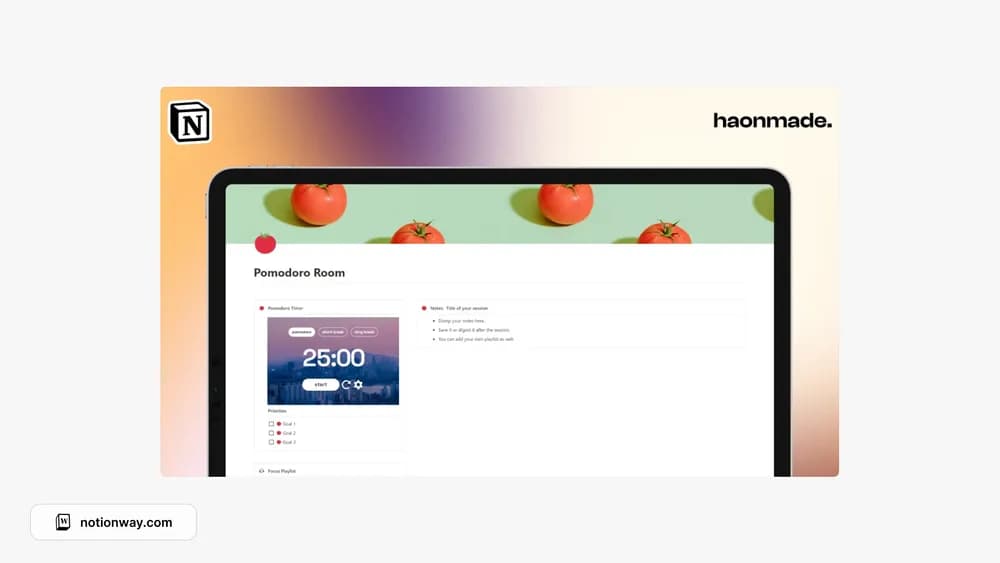
This template brings idea development and a focus-room theme together. It suits a session where you need to clarify the work before doing it. Review the creator’s preview to see how the Pomodoro elements are implemented and whether any widgets have separate requirements.
What’s included
- A Pomodoro timer
- A to-do list for the session’s work
- A notes database for capturing thoughts and reviewing them afterwards
How to use it in practice
Choose one task before starting the timer and define what progress would look like by the break. Put unrelated thoughts in the notes database instead of following them immediately. After the interval, check the result and decide whether another session is useful. Review the captured notes afterwards so the focus page does not become a permanent miscellaneous inbox.
Set it up in your workspace
- Follow the original creator’s checkout or access instructions to obtain the Notion page. Open that page while signed in, then duplicate it into the workspace you want to use.
- Write down the question you are trying to solve. Choose one clear task before beginning a focus session.
- Try one complete example before adding a large backlog. Check that its views and any calculations show what you expect, then replace the sample content with your own.
Who it suits and what to consider
People who want a place to think before starting a task. A compact focus-room layout for people who want a timer beside their work. Check embedded timer behavior in your browser, especially notifications and mobile use.