About Aesthetic Notes & Notebooks
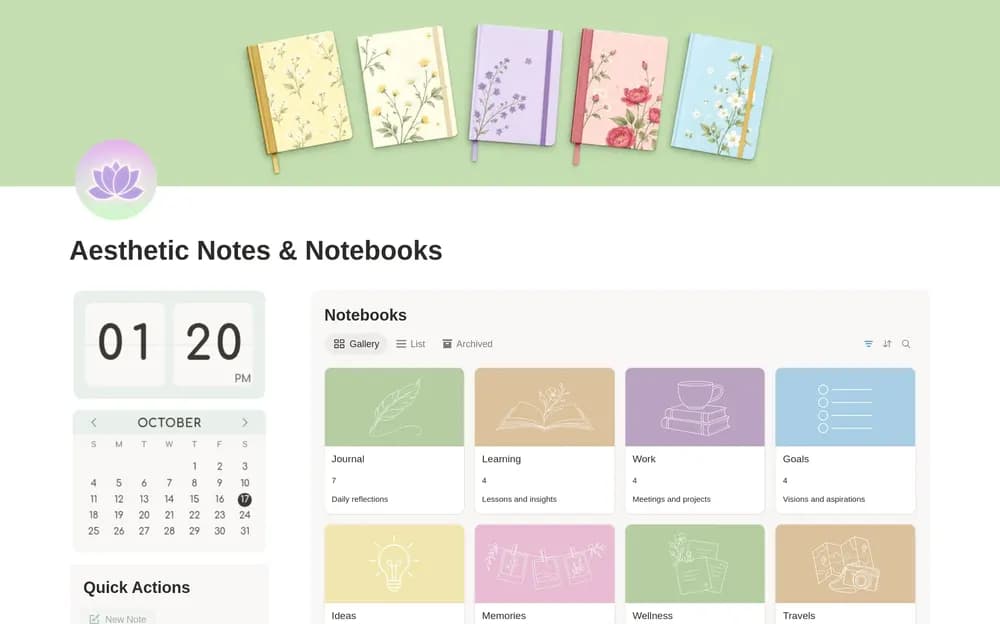
File notes into eight themed notebooks on a Notion shelf, with journal, Cornell, outline, and meeting note templates, status boards, and entry calendars.
What’s included
- Gallery of 8 starter notebooks with individual designs and colors
- Journal, Cornell, outline, and meeting note templates
- Notebook pages with a list, status board, and monthly entry calendar
- Linked notes and notebooks databases with note-count rollups
- Pinned notes in the sidebar and per-notebook archives
How to use it in practice
Rename two or three notebooks to match what you actually write, such as a course name or a work project. Take a week of real notes, choosing the Cornell or outline template for classes and the meeting template for calls. Pin the notes you return to most. At the end of the week, open each notebook page and check whether the status board and calendar help you find things again.
Set it up in your workspace
- Open the original Notion Marketplace listing and add the template to your chosen workspace while signed in. Keep its example records until you understand how the pages connect.
- Rename two or three notebooks to match what you actually write, such as a course name or a work project.
- Try one complete example before adding a large backlog. Check that its views and any calculations show what you expect, then replace the sample content with your own.
Who it suits and what to consider
Students, writers, and professionals who want one attractive notes system for journaling, classes, and meetings. The design centers on eight preset notebooks, so new notebooks need their own styling if you want them to match. Note templates sit in the New button menu, which may be unfamiliar to newer Notion users.