About Audition Tracker for Actors & Performers
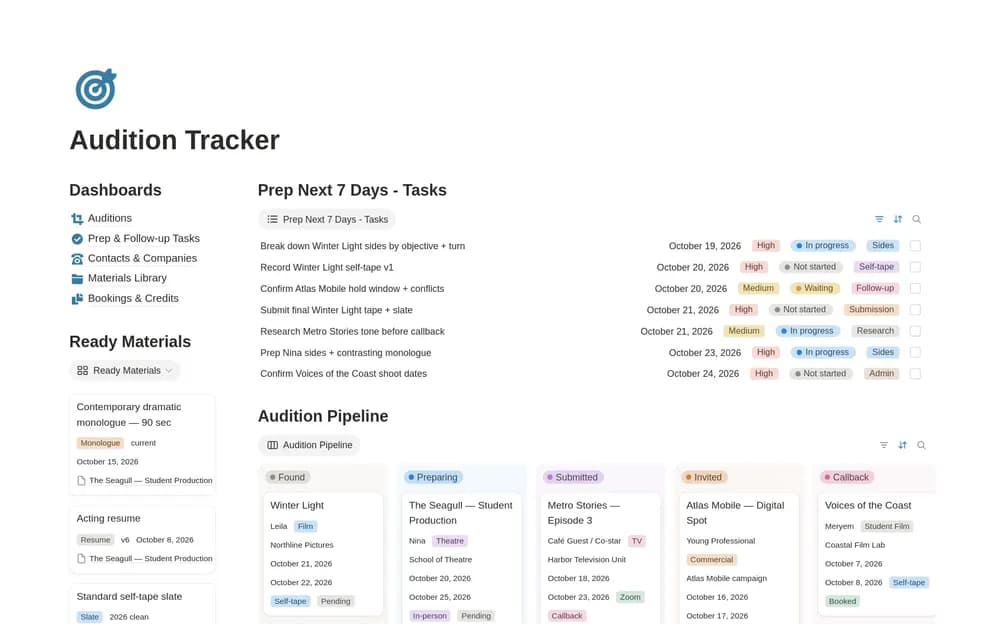
Follow casting opportunities from discovery to booking in Notion, with prep tasks, an acting materials library, contacts, and credits.
What’s included
- Audition database and pipeline from found to booked
- Prep and follow-up tasks
- Materials library for headshots, sides, and self-tapes
- Contacts for casting directors, agents, and companies
- Bookings and credits record with an audition calendar
How to use it in practice
Add the auditions you are currently preparing for or waiting to hear about, and set each one’s pipeline stage. Create prep tasks for sides, self-tapes, and forms with their deadlines. Record the casting contacts involved, then review the calendar each morning and move entries forward as invitations or callbacks arrive.
Set it up in your workspace
- Open the original Notion Marketplace listing and add the template to your chosen workspace while signed in. Keep its example records until you understand how the pages connect.
- Add the auditions you are currently preparing for or waiting to hear about, and set each one’s pipeline stage.
- Try one complete example before adding a large backlog. Check that its views and any calculations show what you expect, then replace the sample content with your own.
Who it suits and what to consider
Actors, acting students, voice performers, and other performers managing several auditions. Casting notices and submissions arrive through other platforms, so dates and links must be entered manually; the listing does not describe any casting-site integration.