About Daily Sales Dashboard
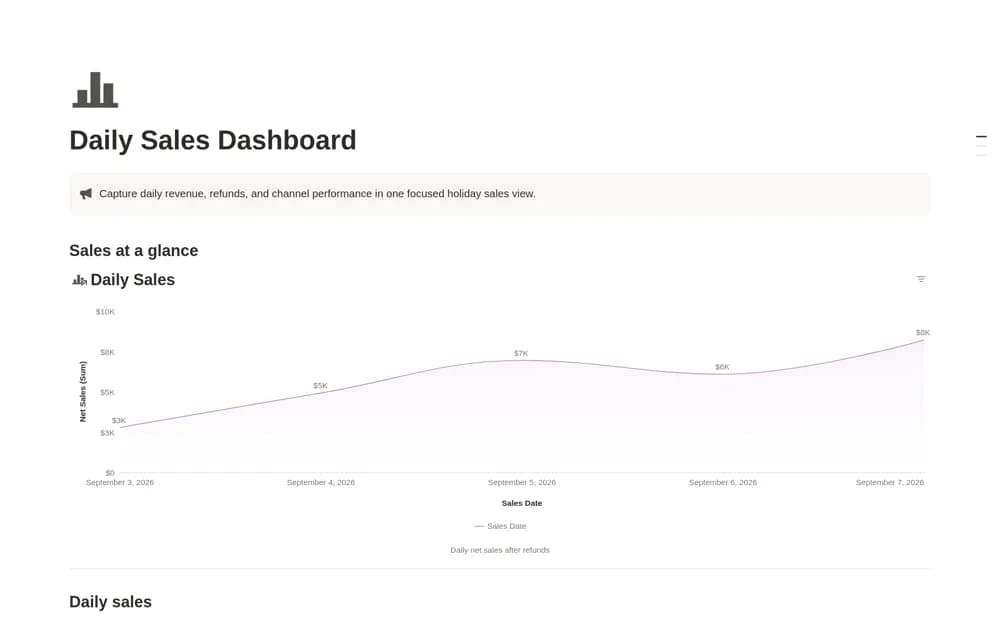
Log ecommerce sales in Notion by date and channel, subtract refunds from gross sales, and review net-sales trends and reporting status.
What’s included
- Dated sales records by channel
- Gross sales and refund inputs
- Net-sales calculation and trend chart
- Open, review, and closed reporting views
How to use it in practice
Enter a completed sales day using the figures from the channel’s report. Record refunds consistently and compare the calculated net sales with the source before closing the period. Review the trend across channels using the same date range so a campaign spike does not obscure missing records.
Set it up in your workspace
- Open the original Notion Marketplace listing and add the template to your chosen workspace while signed in. Keep its example records until you understand how the pages connect.
- Enter a completed sales day using the figures from the channel’s report.
- Try one complete example before adding a large backlog. Check that its views and any calculations show what you expect, then replace the sample content with your own.
Who it suits and what to consider
Online sellers maintaining a manual daily or campaign-level revenue review. Net sales here means gross sales less refunds. It is not profit after product costs, fees, advertising, or taxes, and automatic store imports are not documented.