About Decision Tracker Kanban
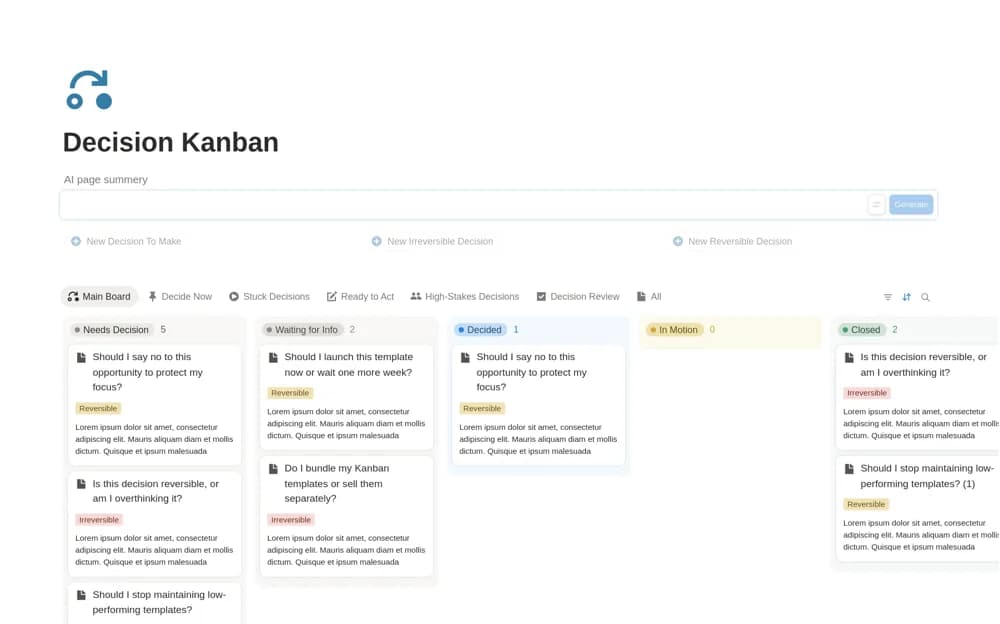
A decision-focused Kanban board organizing questions by status, reversibility, and blockers, with views for decisions ready to make, stuck choices, and follow-through.
What’s included
- Decision-first Kanban board
- Decide Now and Stuck Decisions views
- Ready to Act view and reversibility context
How to use it in practice
Write one unresolved choice as a clear question and identify the information actually missing. Use the blocker view to decide whether to gather evidence or make a reversible call. When the choice is made, record the next action and preserve enough context to learn from it later.
Set it up in your workspace
- Open the original Notion Marketplace listing and add the template to your chosen workspace while signed in. Keep its example records until you understand how the pages connect.
- Write one unresolved choice as a clear question and identify the information actually missing.
- Try one complete example before adding a large backlog. Check that its views and any calculations show what you expect, then replace the sample content with your own.
Who it suits and what to consider
Individuals and teams wanting a lighter routine for moving a question toward an explicit decision. The creator explicitly distinguishes this from task planning and does not center deadlines or priorities. Use a separate delivery plan if decisions need formal approval dates or assigned implementation work.