About Developer ToDo and Sprint Tracker
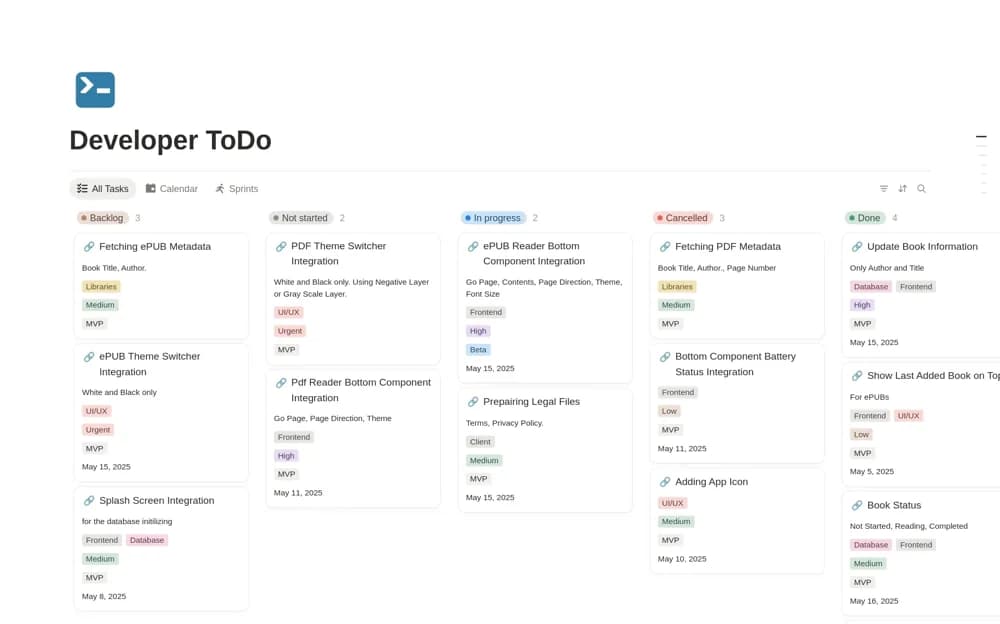
A development Kanban tracker with sprint scope, release targets, stack tags, and task priorities.
What’s included
- Backlog-to-Done Kanban stages
- MVP and Beta release organization
- Technical domain tags and four priority levels
How to use it in practice
Add a small set of current issues with a clear result for each. Agree how priorities differ and assign only a realistic amount of work to the next sprint. Keep the board consistent with the issue system your team already relies on, avoiding conflicting status records.
Set it up in your workspace
- Open the original Notion Marketplace listing and add the template to your chosen workspace while signed in. Keep its example records until you understand how the pages connect.
- Add a small set of current issues with a clear result for each.
- Try one complete example before adding a large backlog. Check that its views and any calculations show what you expect, then replace the sample content with your own.
Who it suits and what to consider
Software developers and technical teams planning smaller delivery cycles. The listing describes organization within Notion, without confirming synchronization with code hosting or an issue tracker.