About Exam Prep Study System
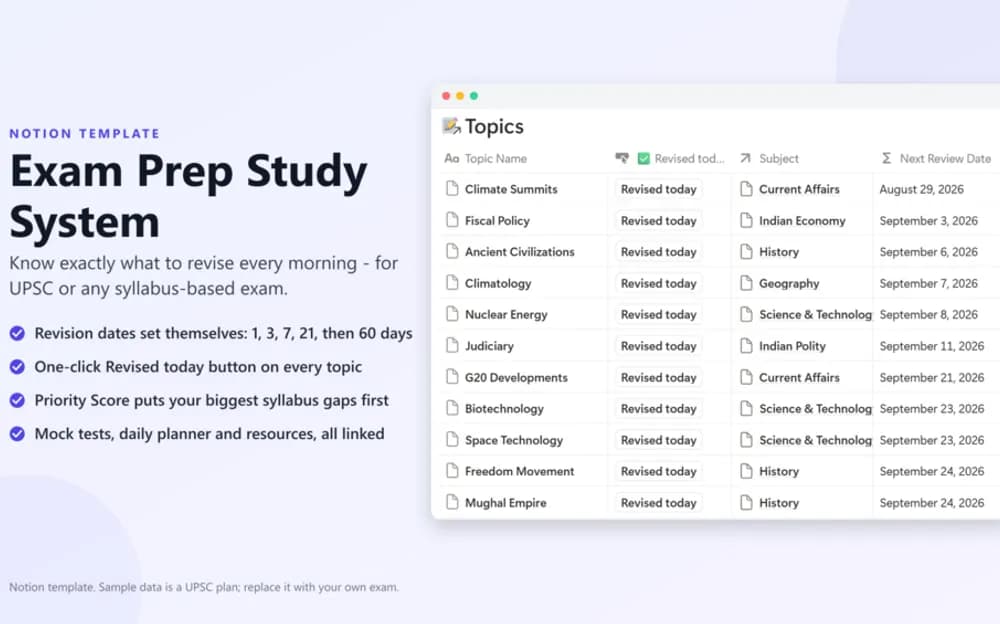
Prepare for syllabus-based exams in Notion with spaced-repetition review dates, subject priority scores, a weak-topics list, and a mock test log.
What’s included
- Automatic review dates after 1, 3, 7, and 21 days
- Due-today list with a one-click revised button
- Subject priority scores from weightage and mastery
- Weak-topics list and mock test log
- Daily study blocks and a rated resources library
How to use it in practice
Replace the sample UPSC subjects with your own exam’s subjects and their weightage. Add the topics you studied this week with a confidence rating. Open the dashboard each morning and use the revised button on topics due for review. Log one mock test at the end of the week and note the mistakes.
Set it up in your workspace
- Follow the original creator’s checkout or access instructions to obtain the Notion page. Open that page while signed in, then duplicate it into the workspace you want to use.
- Replace the sample UPSC subjects with your own exam’s subjects and their weightage.
- Try one complete example before adding a large backlog. Check that its views and any calculations show what you expect, then replace the sample content with your own.
Who it suits and what to consider
Students preparing for competitive or university exams with a defined syllabus. The sample data reflects a UPSC plan and needs replacing. Only one of the chart views displays on Notion’s free plan.