About Exam Revision Tracker
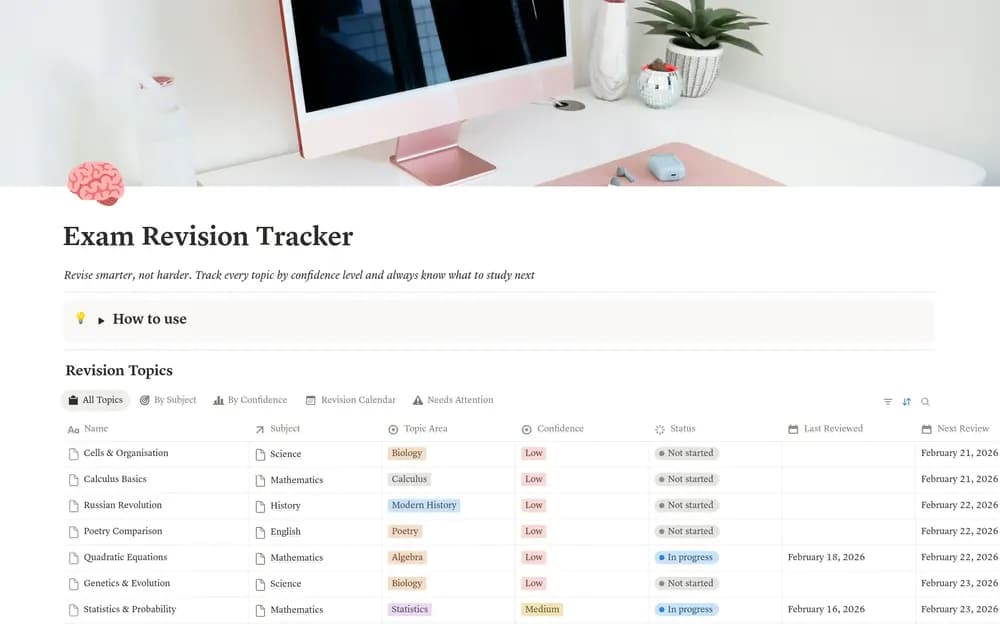
Plan exam revision in Notion by rating each topic’s confidence, surfacing weak areas first, and scheduling reviews on a calendar by subject.
What’s included
- All Topics list ordered by confidence and next review
- Needs Attention view for low-confidence topics
- Board by confidence level and grouping by subject
- Revision calendar
- Subject overview with mastered and low-confidence counts
How to use it in practice
Add the topics for one subject and give each an honest low, medium, or high confidence rating. Open Needs Attention before each study session and pick a weak topic. After studying, update its confidence and next review date, then check the subject overview at the end of the week to see how the balance has shifted.
Set it up in your workspace
- Open the original Notion Marketplace listing and add the template to your chosen workspace while signed in. Keep its example records until you understand how the pages connect.
- Add the topics for one subject and give each an honest low, medium, or high confidence rating.
- Try one complete example before adding a large backlog. Check that its views and any calculations show what you expect, then replace the sample content with your own.
Who it suits and what to consider
Students preparing for GCSEs, A-Levels, or university finals who want to focus study time on weaker topics. Confidence ratings are self-assessed, so they work best alongside practice questions or past papers. The template does not generate a spaced-repetition schedule; you set review dates yourself.