About Instagram Content Calendar
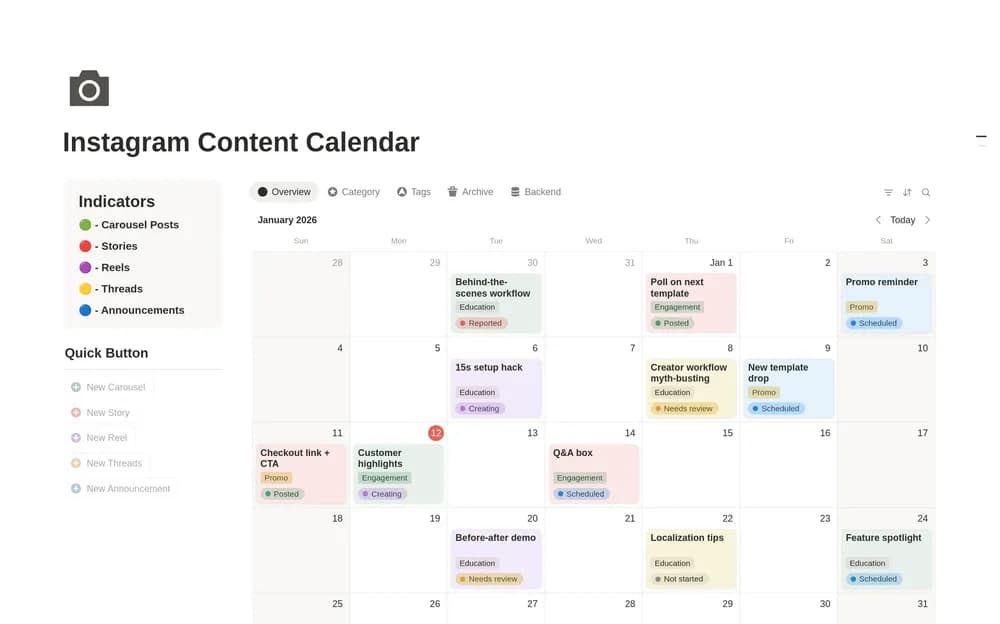
An Instagram calendar is useful when the post is connected to the work behind it. Use the layout to keep copy and asset context close to the date. Check the creator’s preview for included fields and remember that planning a post does not automatically publish it.
What’s included
- An Instagram-oriented content schedule
- Organization for post ideas and captions
- Publication dates kept alongside the content plan
How to use it in practice
Plan a small batch of posts with a purpose, draft caption, and asset requirement. Check the next few dates against your actual production time and leave room for timely posts. Keep unfinished work visible until it is ready, then retain the published link for later review. Revisit ideas that performed well before building another large backlog.
Set it up in your workspace
- Open the original Notion Marketplace listing and add the template to your chosen workspace while signed in. Keep its example records until you understand how the pages connect.
- Plan a small batch of posts and identify what each still needs. Start with your actual production capacity.
- Try one complete example before adding a large backlog. Check that its views and any calculations show what you expect, then replace the sample content with your own.
Who it suits and what to consider
Creators planning a consistent Instagram schedule. A focused choice for Instagram planning. Posting, asset production, and current platform requirements remain part of your publishing workflow.