About Life Dashboard
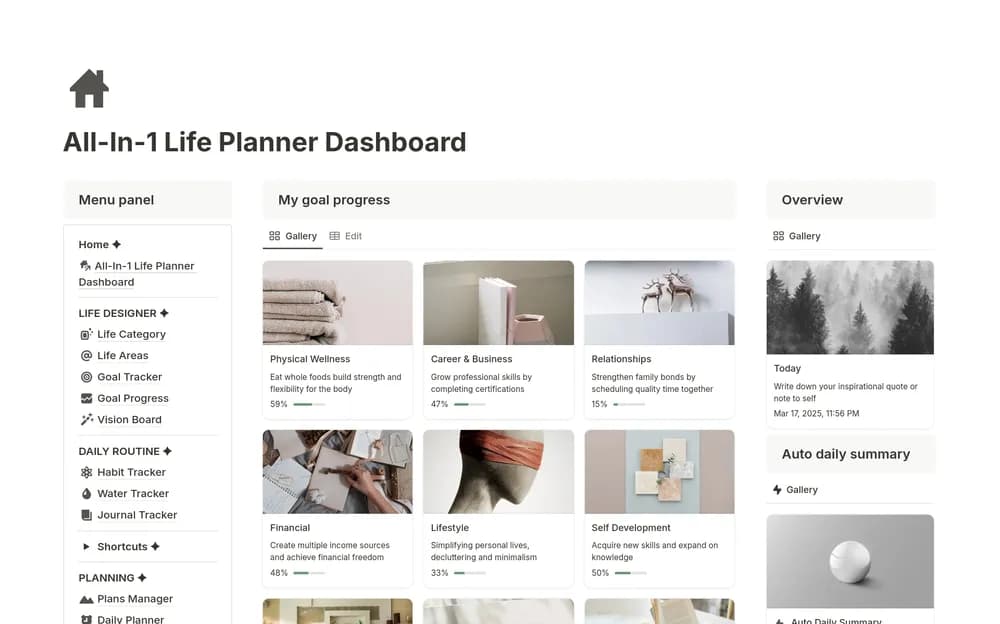
Clarity Mastery’s All-in-1 Life Dashboard is a paid personal-productivity template. A broader dashboard can be useful when goals and everyday plans are spread across unrelated pages, but its value depends on which sections you actually return to. Review the creator’s current contents and preview before buying. Choose one routine you already have, such as planning the next day, and consider how the dashboard would support it. Try that routine first. Other sections can follow once they serve a clear purpose, without requiring you to reorganize every part of your life at once.
What’s included
- Life, goal, habit, journal, project, and task sections
- A vision board and focus-planning area
- Media, notes, bookmarks, and finance trackers
How to use it in practice
Choose a daily starting page and a few sections that solve current problems. Add a real goal, its next task, and the notes you need to act on it. Use occasional collections such as media and bookmarks when relevant rather than reviewing every tracker daily. Revisit the dashboard after a week and simplify any section that has become maintenance without a clear benefit.
Set it up in your workspace
- Open the original Notion Marketplace listing and add the template to your chosen workspace while signed in. Keep its example records until you understand how the pages connect.
- Begin with one current goal and the daily pages you expect to open. Review a normal week before adding more sections.
- Try one complete example before adding a large backlog. Check that its views and any calculations show what you expect, then replace the sample content with your own.
Who it suits and what to consider
People who want to keep several parts of everyday life close together. A broad personal workspace for people who prefer a consistent home for several routines. Compare the depth of an individual module if you need a specialist finance, project, or study system.