About Light Blue Student Dashboard
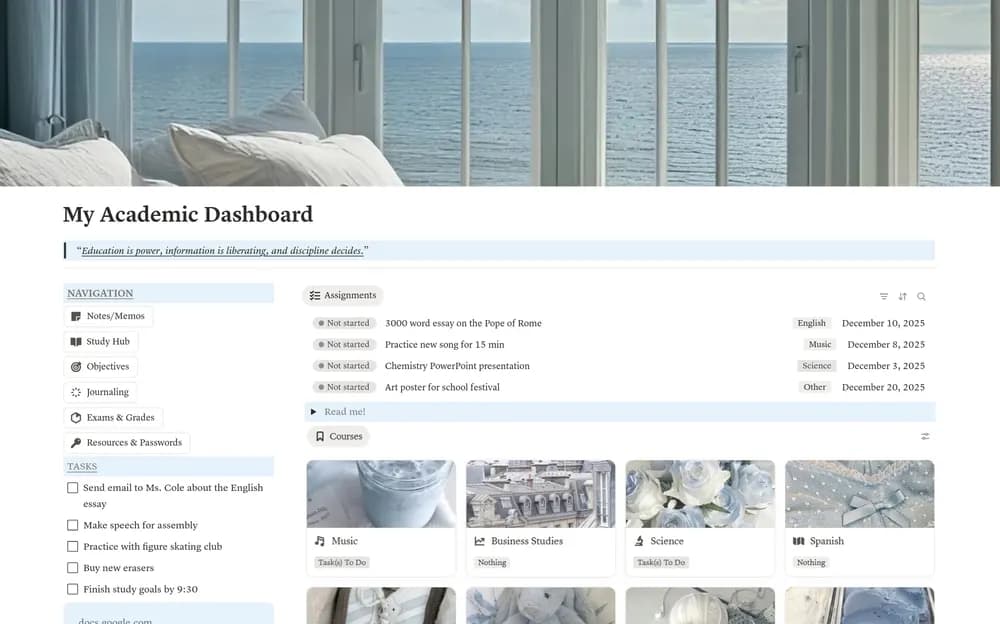
Organize a school term on one light blue Notion dashboard covering assignments, exams, grades, study sessions, goals, schedules, notes, and journaling.
What’s included
- Assignment and exam tracking
- Grades and academic goals
- Study, schedule, and event sections
- Tasks, notes, resources, and course pages
- Journaling space
How to use it in practice
Set up your current courses first and add the exams and assignments already on the calendar. Record any grades you have received so far. Use the study and task sections daily for a week, and write a short journal entry each evening to see whether keeping everything in one place is helping.
Set it up in your workspace
- Open the original Notion Marketplace listing and add the template to your chosen workspace while signed in. Keep its example records until you understand how the pages connect.
- Set up your current courses first and add the exams and assignments already on the calendar.
- Try one complete example before adding a large backlog. Check that its views and any calculations show what you expect, then replace the sample content with your own.
Who it suits and what to consider
Students who want academic planning and visual styling in a single homepage. The listing summarizes the areas covered without describing the databases or views, so preview the structure before setting up a full term. Grade calculations are not specified.