About Notion Student's Index
An index is useful when the challenge is navigating information rather than collecting more of it. This student-focused listing is a place to start exploring that approach. Check the creator’s preview to see how the structure fits your own subjects and notes.
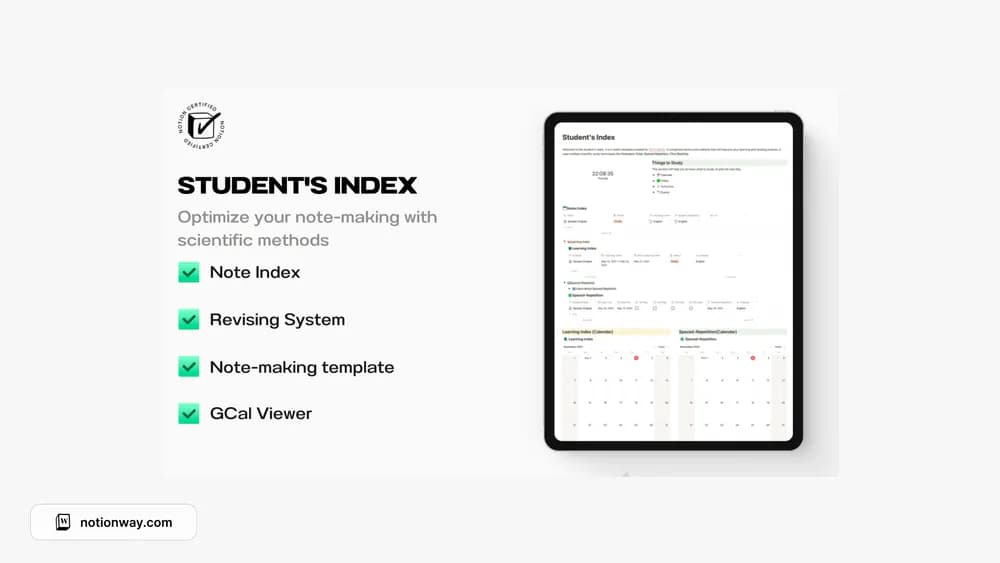
What’s included
- A planner with a notes index
- A learner’s index in table and calendar views
- Spaced-repetition views and a Google Calendar viewer
How to use it in practice
Use the notes index for a single topic you need to remember. After a study session, record what you can recall without looking and schedule the next review through the available repetition view. Adjust intervals around your exam date and how well you remember the material. A review date is useful only when it points to a specific retrieval or practice task.
Set it up in your workspace
- Follow the original creator’s checkout or access instructions to obtain the Notion page. Open that page while signed in, then duplicate it into the workspace you want to use.
- Map your current subjects to the layout. Try finding a note from a previous class before adding a larger archive.
- Try one complete example before adding a large backlog. Check that its views and any calculations show what you expect, then replace the sample content with your own.
Who it suits and what to consider
Students who value findable course information. Fits students who want a note-review routine. A calendar viewer is a viewing feature; check the creator’s instructions before assuming it creates or synchronizes external events.