About Media Project Planner for Content & Production
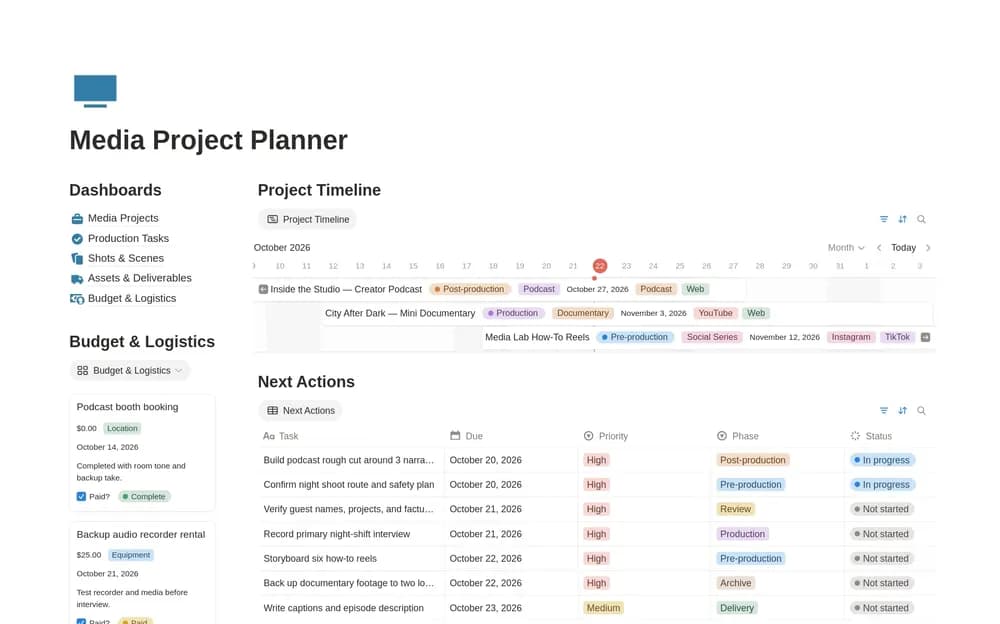
Coordinate video, podcast, and social productions in Notion, linking projects to tasks, shot lists, assets, budgets, logistics, and shoot dates.
What’s included
- Media projects database with a project timeline
- Production tasks by phase, priority, and status
- Shots and scenes planning for interviews, b-roll, and recordings
- Assets and deliverables pipeline through review and approval
- Budget, logistics, and shoot schedule calendar
How to use it in practice
Set up one real production, such as your next video, and place it on the timeline with its delivery date. Break it into pre-production, production, and post-production tasks, then list the shots or scenes you need. Add equipment, location, and other costs to the budget and logistics section, and put shoot days on the schedule. As files come in, move them through the asset pipeline and see whether the Next Actions view keeps the week on track.
Set it up in your workspace
- Open the original Notion Marketplace listing and add the template to your chosen workspace while signed in. Keep its example records until you understand how the pages connect.
- Set up one real production, such as your next video, and place it on the timeline with its delivery date.
- Try one complete example before adding a large backlog. Check that its views and any calculations show what you expect, then replace the sample content with your own.
Who it suits and what to consider
Video producers, filmmakers, creative agencies, and creators managing productions from planning to delivery. The template tracks assets and approvals but is not described as file storage or connected to editing software, so link to cloud folders instead. Budget figures are manual entries rather than accounting records.