About Minimal Money Manager
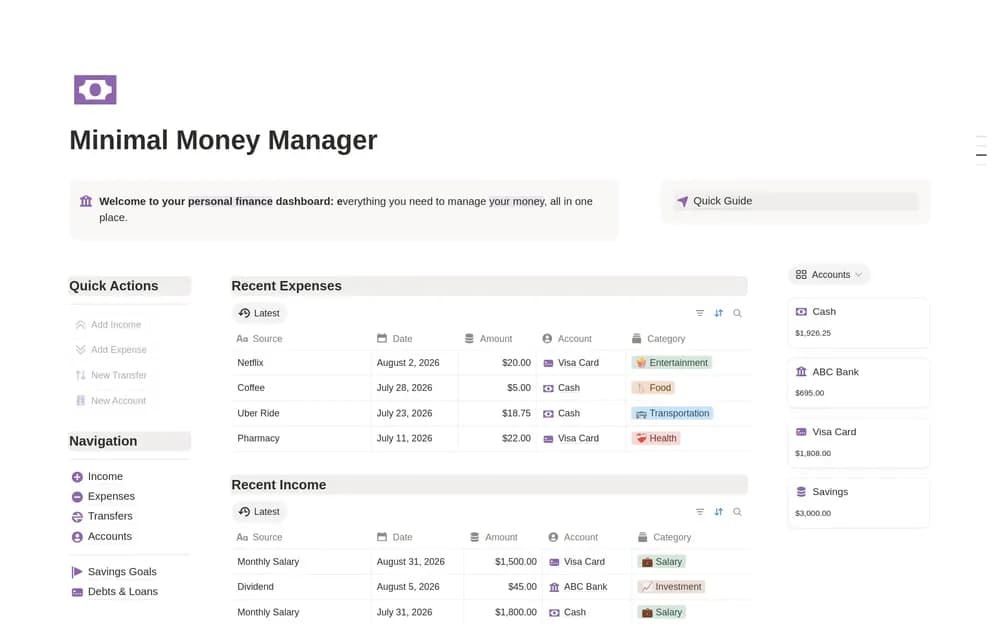
Keep income, expenses, account balances, savings goals, and loans in connected Notion databases, summarized on one minimal finance dashboard.
What’s included
- Dashboard with monthly overview
- Income and expense trackers
- Accounts with balance tracking
- Savings goals
- Loans and debts
How to use it in practice
Add each account with its current balance, then log income and spending for one week. Create one savings goal, and one loan or debt record if you have any. Check the dashboard daily to confirm balances update as you expect. At the end of the week, compare account balances with your bank to spot missed entries.
Set it up in your workspace
- Open the original Notion Marketplace listing and add the template to your chosen workspace while signed in. Keep its example records until you understand how the pages connect.
- Add each account with its current balance, then log income and spending for one week.
- Try one complete example before adding a large backlog. Check that its views and any calculations show what you expect, then replace the sample content with your own.
Who it suits and what to consider
Students, professionals, and freelancers who want a lightweight finance system with accounts and debts included. The listing is brief and does not describe category budgets or reports beyond the monthly overview. Data entry is manual.