About My Class Schedule
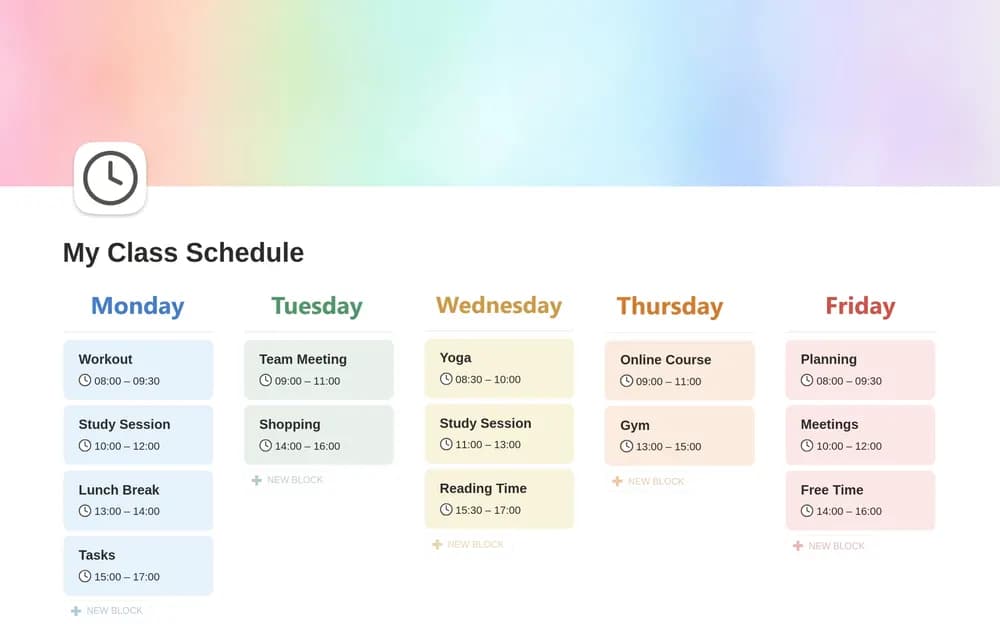
Map out classes or activities hour by hour on a color-coded weekly board in Notion, with custom subject names and a layout that works on mobile.
What’s included
- Weekly board for hour-by-hour classes or activities
- Custom subject names
- Color-coded layout
- Desktop and mobile compatibility
How to use it in practice
Enter your fixed weekly classes with their times first. Rename subjects to match your courses and give each a consistent color. Add recurring activities such as work shifts or practice, then check the board on your phone before each day to see whether it is quicker than your current timetable.
Set it up in your workspace
- Open the original Notion Marketplace listing and add the template to your chosen workspace while signed in. Keep its example records until you understand how the pages connect.
- Enter your fixed weekly classes with their times first.
- Try one complete example before adding a large backlog. Check that its views and any calculations show what you expect, then replace the sample content with your own.
Who it suits and what to consider
Students and freelancers who want an attractive weekly timetable they can check on any device. It is a timetable rather than an assignment or homework tracker, so deadlines need a separate list. Classes are entered by hand for the weekly view.