About Outreach Tracker
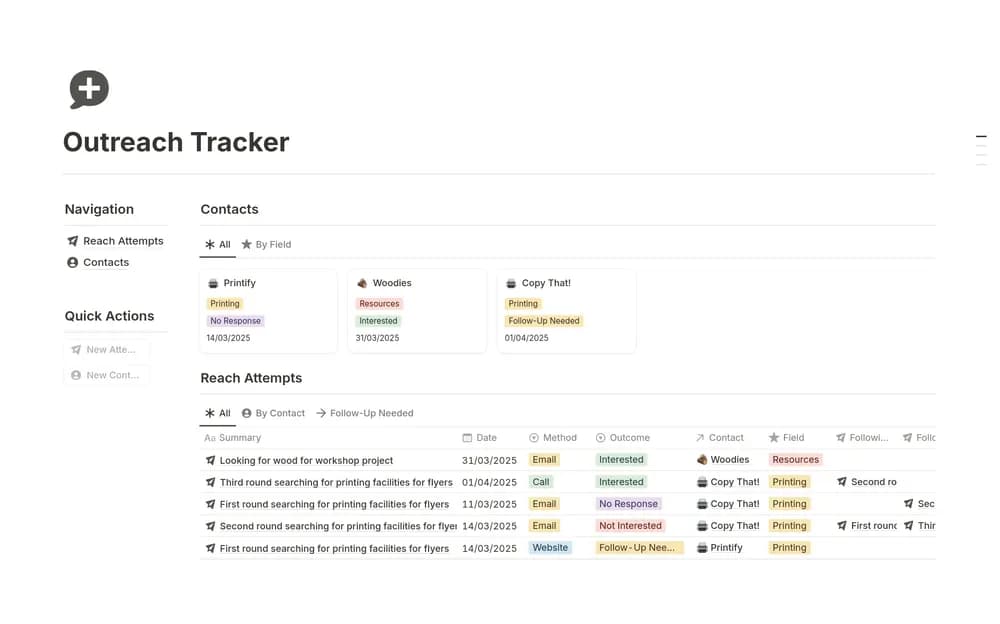
Log professional contacts and every outreach attempt in Notion, tagging each by field and response status so follow-ups stay visible.
What’s included
- Contact management database
- Outreach attempt tracking
- Statuses such as Interested, No Response, and Follow-Up Needed
- Field categories
- Quick action buttons
How to use it in practice
Add ten people you have contacted or plan to contact this week and assign each a field. Record every message as an outreach attempt with its date. When someone replies, update the status, and check the Follow-Up Needed group at the end of the week to plan your next messages.
Set it up in your workspace
- Open the original Notion Marketplace listing and add the template to your chosen workspace while signed in. Keep its example records until you understand how the pages connect.
- Add ten people you have contacted or plan to contact this week and assign each a field.
- Try one complete example before adding a large backlog. Check that its views and any calculations show what you expect, then replace the sample content with your own.
Who it suits and what to consider
Freelancers, job seekers, creators, and small business owners reaching out to many contacts. Messages are not sent or tracked from email or LinkedIn automatically; each attempt and reply must be logged by hand.