About Personal Budget & Expense Tracker
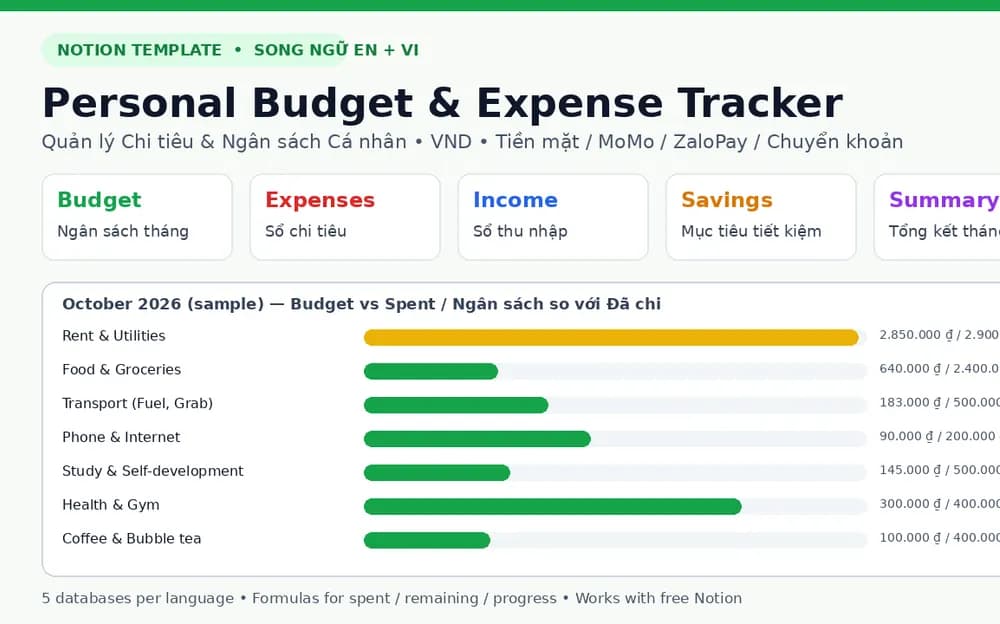
Budget a month in Notion by needs, wants, and savings, with color warnings, separate income and expense logs, and savings goals with progress bars.
What’s included
- Monthly budget categories with spent, remaining, and color alerts
- Expense log with local payment methods such as MoMo and ZaloPay
- Income log for salary, freelance, tutoring, and family support
- Savings goals with progress and the monthly amount needed
- Monthly summary of income, spending, and savings rate
How to use it in practice
Set this month’s category limits from your real income, then log every expense for a week, including small cash purchases. Record income as it arrives and add one savings goal, such as an emergency fund. At the end of the week, check which categories have turned yellow or red and adjust your limits.
Set it up in your workspace
- Follow the original creator’s checkout or access instructions to obtain the Notion page. Open that page while signed in, then duplicate it into the workspace you want to use.
- Set this month’s category limits from your real income, then log every expense for a week, including small cash purchases.
- Try one complete example before adding a large backlog. Check that its views and any calculations show what you expect, then replace the sample content with your own.
Who it suits and what to consider
Students and young workers in Vietnam managing a first salary, part-time income, or family support. The expense log is built around VND amounts and Vietnamese payment methods, with full English and Vietnamese editions. Every transaction is entered by hand, and the creator notes it is not financial advice.