About Podcast Finance & Reporting Dashboard
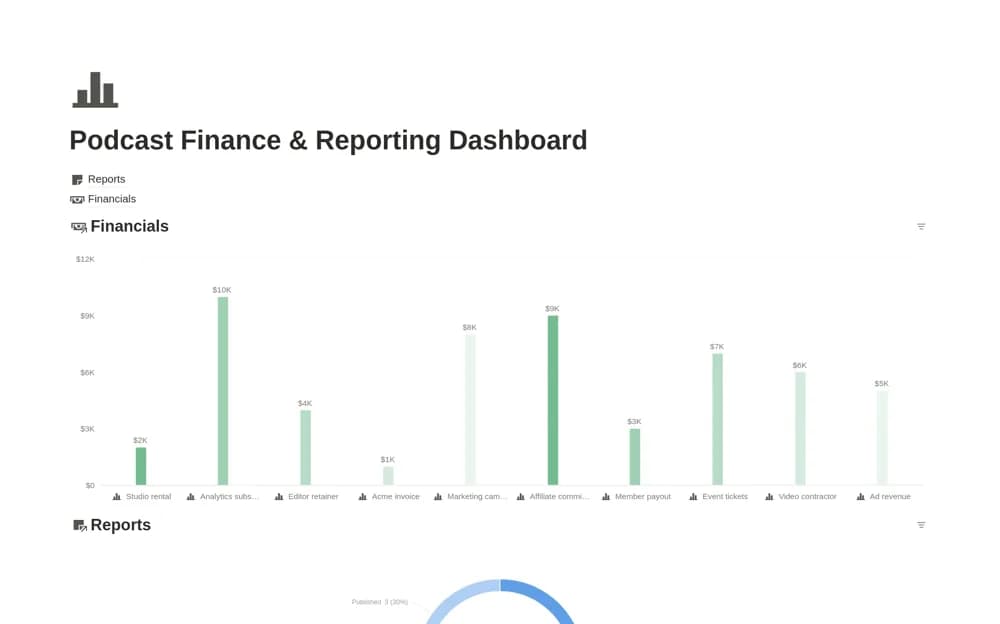
A podcast administration dashboard with separate financial transactions and report records, including payment or approval stages, cash timing, reporting periods, findings, and next actions.
What’s included
- Financials database with dates, tax, accounts, and status
- Cash calendar and cash-flow chart
- Reports workflow with periods, owners, and supporting links
How to use it in practice
Enter a completed financial item and check its net direction and payment status. Create a report for the same period, linking the actual source metrics and a clear next action. Review cash timing separately from report publication so a finished summary does not hide an unpaid item.
Set it up in your workspace
- Open the original Notion Marketplace listing and add the template to your chosen workspace while signed in. Keep its example records until you understand how the pages connect.
- Enter a completed financial item and check its net direction and payment status.
- Try one complete example before adding a large backlog. Check that its views and any calculations show what you expect, then replace the sample content with your own.
Who it suits and what to consider
Podcast operators reviewing money records and recurring performance reports in one place. The financial calculations and reporting summaries depend on recorded inputs. The listing does not confirm live bank, sponsor, or podcast-host analytics connections.