About Retail Business OS – Inventory & Store Operations
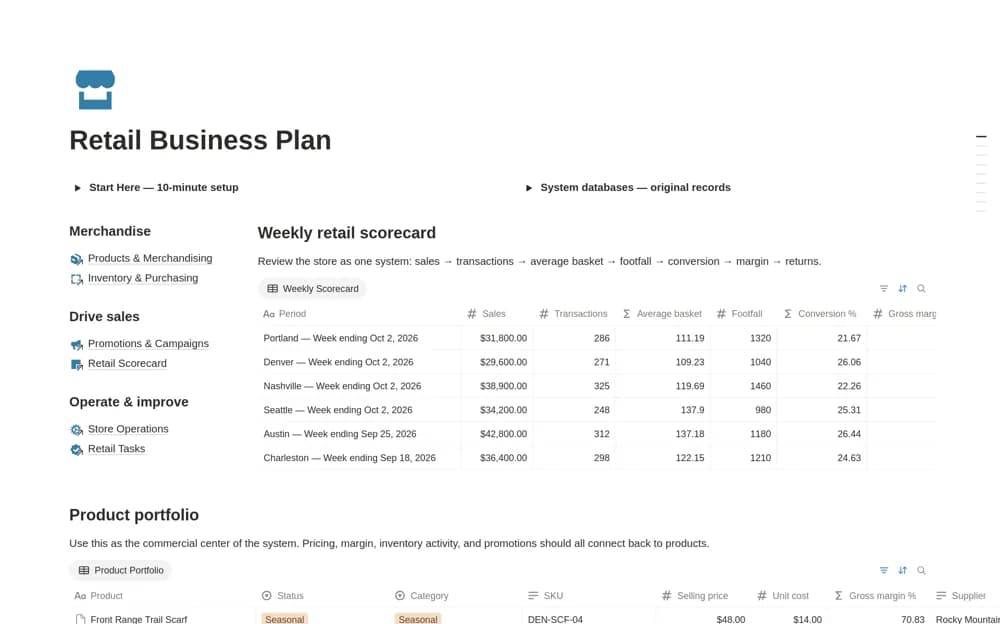
A retail workspace connecting a weekly store scorecard, product portfolio, inventory, purchasing, promotions, and operating tasks, with product costs and stock context close to performance measures.
What’s included
- Weekly Retail Scorecard
- Product Portfolio with SKU and cost context
- Inventory, purchasing, promotion, and operations records
How to use it in practice
Add a small product range and check units, costs, and stock counts against the actual store. Review one week’s scorecard using figures from the sales system, then assign a practical action to a concern. Follow a purchase through inbound delivery before using the stock view to plan replenishment.
Set it up in your workspace
- Open the original Notion Marketplace listing and add the template to your chosen workspace while signed in. Keep its example records until you understand how the pages connect.
- Add a small product range and check units, costs, and stock counts against the actual store.
- Try one complete example before adding a large backlog. Check that its views and any calculations show what you expect, then replace the sample content with your own.
Who it suits and what to consider
Independent retailers and shop managers coordinating stock, merchandising, and store routines. The listing describes organizing retail records. It does not establish a live connection to a point-of-sale or ecommerce platform, so confirm import requirements before adopting it.