About Sticky Notes & Planner
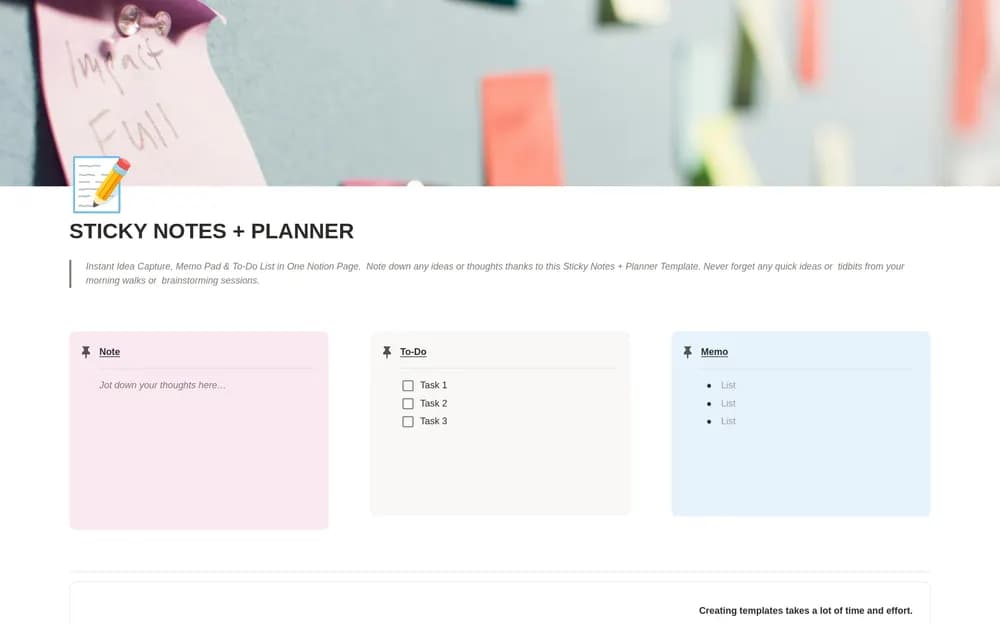
Catch passing thoughts on a Notion page that combines a sticky-notes board for ideas, a memo pad for short lists, and a simple to-do checklist.
What’s included
- Sticky notes board for raw ideas
- Memo pad for short lists
- To-do checklist
- No databases or setup required
How to use it in practice
Keep the page open in a pinned tab and add ideas to the sticky board the moment they come up. Use the memo pad for short lists like errands, and the checklist for tasks you plan to finish today. At the end of the week, move the ideas worth keeping into your main notes or task system.
Set it up in your workspace
- Open the original Notion Marketplace listing and add the template to your chosen workspace while signed in. Keep its example records until you understand how the pages connect.
- Keep the page open in a pinned tab and add ideas to the sticky board the moment they come up.
- Try one complete example before adding a large backlog. Check that its views and any calculations show what you expect, then replace the sample content with your own.
Who it suits and what to consider
Students and professionals who want a single always-open tab for ideas and small tasks. Without databases, there are no dates, tags, or filtered views, so it works best as a short-term capture space. Long-term notes are better moved elsewhere.