About User Feedback Log
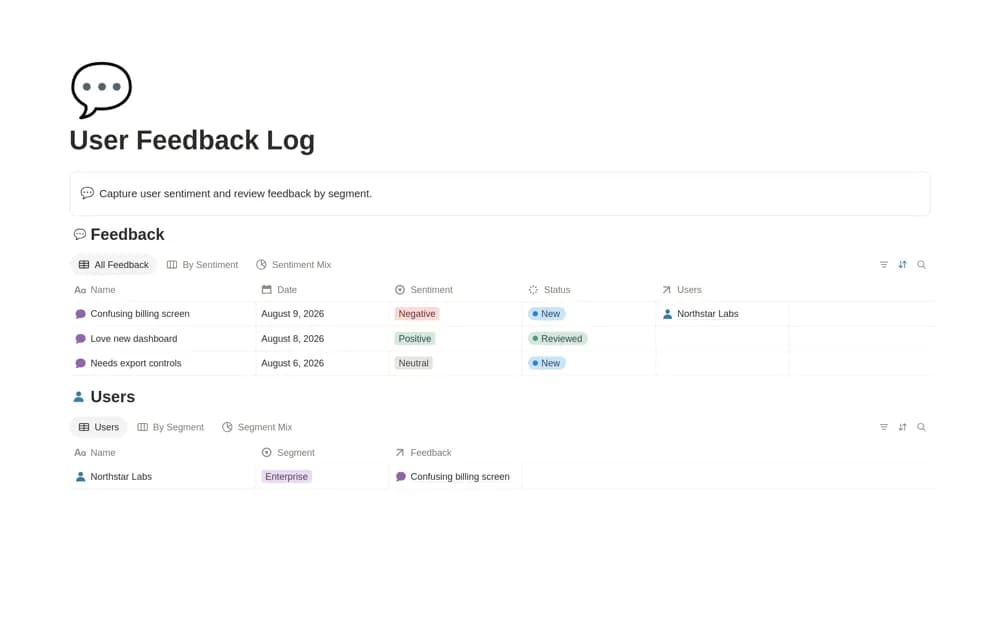
A customer feedback log linking users, sentiment tags, customer segments, and searchable observations.
What’s included
- Feedback records connected to users
- Sentiment tagging and a sentiment-mix chart
- Views by enterprise, SMB, and free-user segments
How to use it in practice
Record the original context and distinguish the customer’s words from your interpretation. Apply sentiment tags consistently and compare segments without overlooking sample size. Link decisions to supporting observations while retaining feedback that challenges the team’s current assumptions.
Set it up in your workspace
- Open the original Notion Marketplace listing and add the template to your chosen workspace while signed in. Keep its example records until you understand how the pages connect.
- Record the original context and distinguish the customer’s words from your interpretation.
- Try one complete example before adding a large backlog. Check that its views and any calculations show what you expect, then replace the sample content with your own.
Who it suits and what to consider
Product teams reviewing feedback without a separate research repository. Sentiment labels summarize entered feedback; the source does not establish automatic ingestion or representative research.