About Video Game Development Task Manager
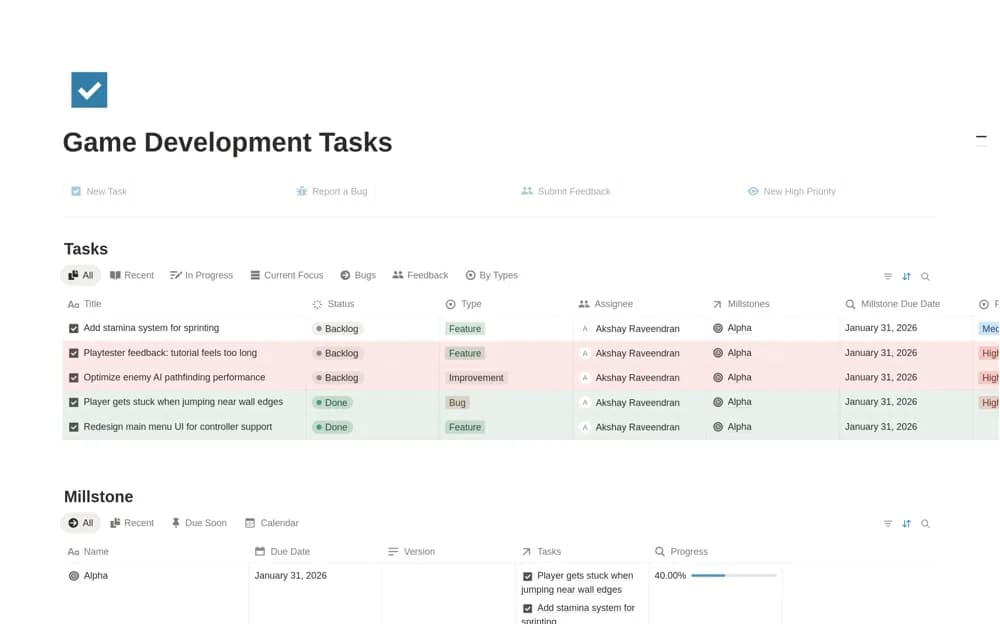
Manage game-development features, bugs, and player feedback in Notion, with assigned tasks, testing stages, and Alpha or Beta milestones.
What’s included
- Task board with testing status
- Bug and player-feedback classifications
- Screenshots and reproduction-step records
- Alpha and Beta milestone progress
How to use it in practice
Add a bug from the current build with clear reproduction steps and an attachment. Assign it to the appropriate milestone and owner, then move it through implementation and testing. Review the milestone summary before a playtest and confirm fixes in the game rather than relying on checked tasks alone.
Set it up in your workspace
- Open the original Notion Marketplace listing and add the template to your chosen workspace while signed in. Keep its example records until you understand how the pages connect.
- Add a bug from the current build with clear reproduction steps and an attachment.
- Try one complete example before adding a large backlog. Check that its views and any calculations show what you expect, then replace the sample content with your own.
Who it suits and what to consider
Indie game developers and small teams preparing builds and organizing playtest feedback. This organizes development work. It is not a game library for players, a build system, or an automated testing service.