About Team Project Management System
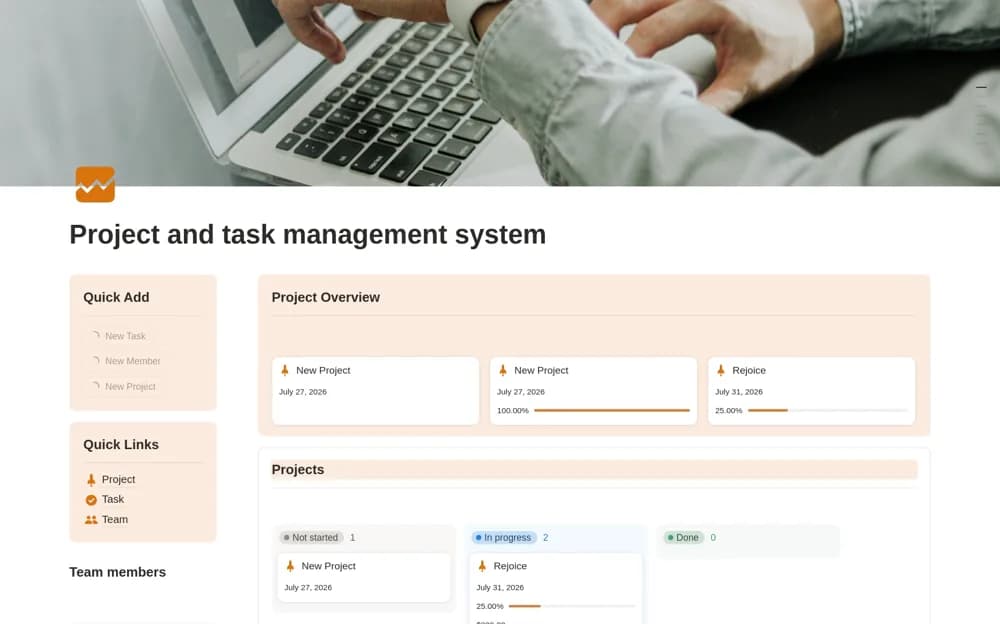
A project and task dashboard with team assignments, progress states, deadline calendars, and quick-add actions.
What’s included
- Active, completed, and overdue project views
- Task and project assignments with a team directory
- Status boards, calendar, and quick-add navigation
How to use it in practice
Create one active project and divide it into clear deliverables. Assign owners and realistic dates, then test how the dashboard reports overdue work. Review progress against completed outcomes rather than merely moving cards, and simplify fields your team does not maintain.
Set it up in your workspace
- Open the original Notion Marketplace listing and add the template to your chosen workspace while signed in. Keep its example records until you understand how the pages connect.
- Create one active project and divide it into clear deliverables.
- Try one complete example before adding a large backlog. Check that its views and any calculations show what you expect, then replace the sample content with your own.
Who it suits and what to consider
Small teams and freelancers coordinating several projects in one workspace. The source describes task and progress organization, without establishing resource forecasting or external-system synchronization.